Building systems before anyone has decided what good looks like?
Fall Frameworks is the follow-up to Reimagen's AI Systems Playbook. The feedback on that series: great, but it was firehosing readers at step 50 while they were still figuring out step 1.
So this series starts with the foundations. Before any agent, pipeline, or new tool, decide what the work needs.
What Is a Framework?
Most of the time, the missing piece is a framework. No amount of system building saves a bad decision-making process.
Every system sits on a framework somebody has to decide first:
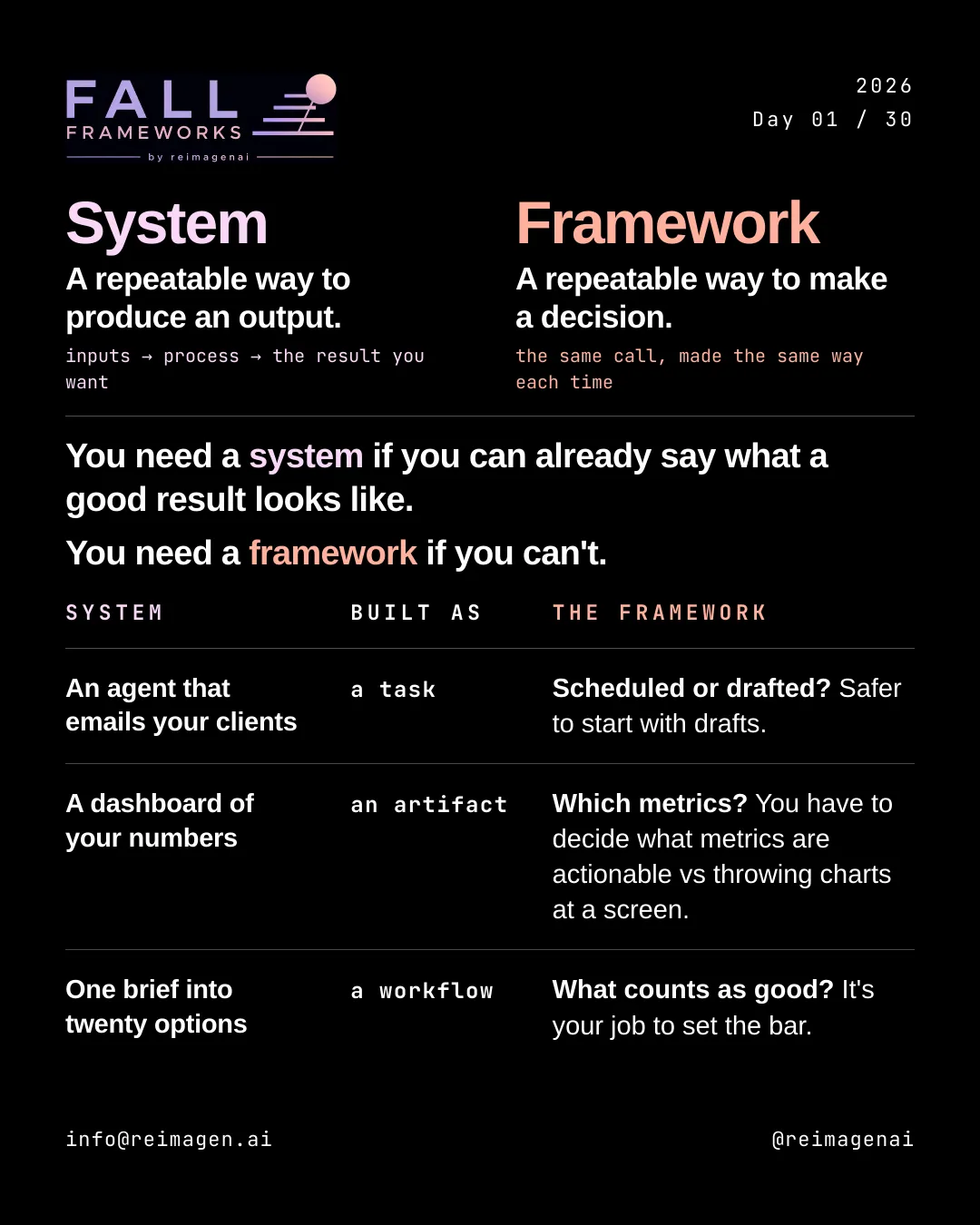
System
A repeatable way to produce an output.
Inputs, a process, and the result you want. You need a system if you can already say what a good result looks like.
Framework
A repeatable way to make a decision.
The same call, made the same way each time. You need a framework if you can't.
System: a task
An agent that emails your clients
The framework: scheduled or drafted? Safer to start with drafts.
System: an artifact
A dashboard of your numbers
The framework: which metrics? You have to decide what metrics are actionable vs throwing charts at a screen.
System: a workflow
One brief into twenty options
The framework: what counts as good? It's your job to set the bar.
Agent rollouts go sideways when the framework is fuzzy. The agent inherits a process nobody documented, a result nobody defined, and a mandate nobody owns. You get the same confusion, but faster.
The Framework-First Rule: ask these three questions before building:
Can the team describe a good result?
Would two people make the same call from the same inputs?
Is there an owner when an edge case arrives?
If the answer to all three is yes, the system is ready to build. If not, the framework comes first.
The Cost of Being Too Early
You hear a lot about the risk of falling behind on AI. You can also cut yourself on the bleeding edge.
The hype cycle wants you to believe you must try every new tool immediately or miss the boat. Most of the time, that is your ego experiencing frontier FOMO. Let that baby go.
Reimagen is regularly invited to test frontier tools through creator programs, ambassador programs, sponsored access, and creative-lab partnerships with Dreamina, ElevenLabs, fal, Topview, and Reactor.
Strategic partner access gets a real test. Reimagen will gladly spend the time when the relationship matters and production feedback can help shape the product.
New beta invitations are always welcome. Before Reimagen commits production time, the tool has to show where it fits in the workflow. Sometimes the VIP badge also says unpaid QA. The credits were free. The price was your time and sanity.
The Early-Adopter Tax: outside those strategic relationships, a tool enters the production stack only if it clears at least one bar:
It speeds up an existing workflow.
It unlocks something that was previously impossible.
It removes recurring pain.
Everything else goes to the waiting list.
Do You Need a Workaround or Infrastructure?
Most of the time, go for the workaround.
Before you add another AI tool, check whether a workaround covers it:
3 slides, swipe for more
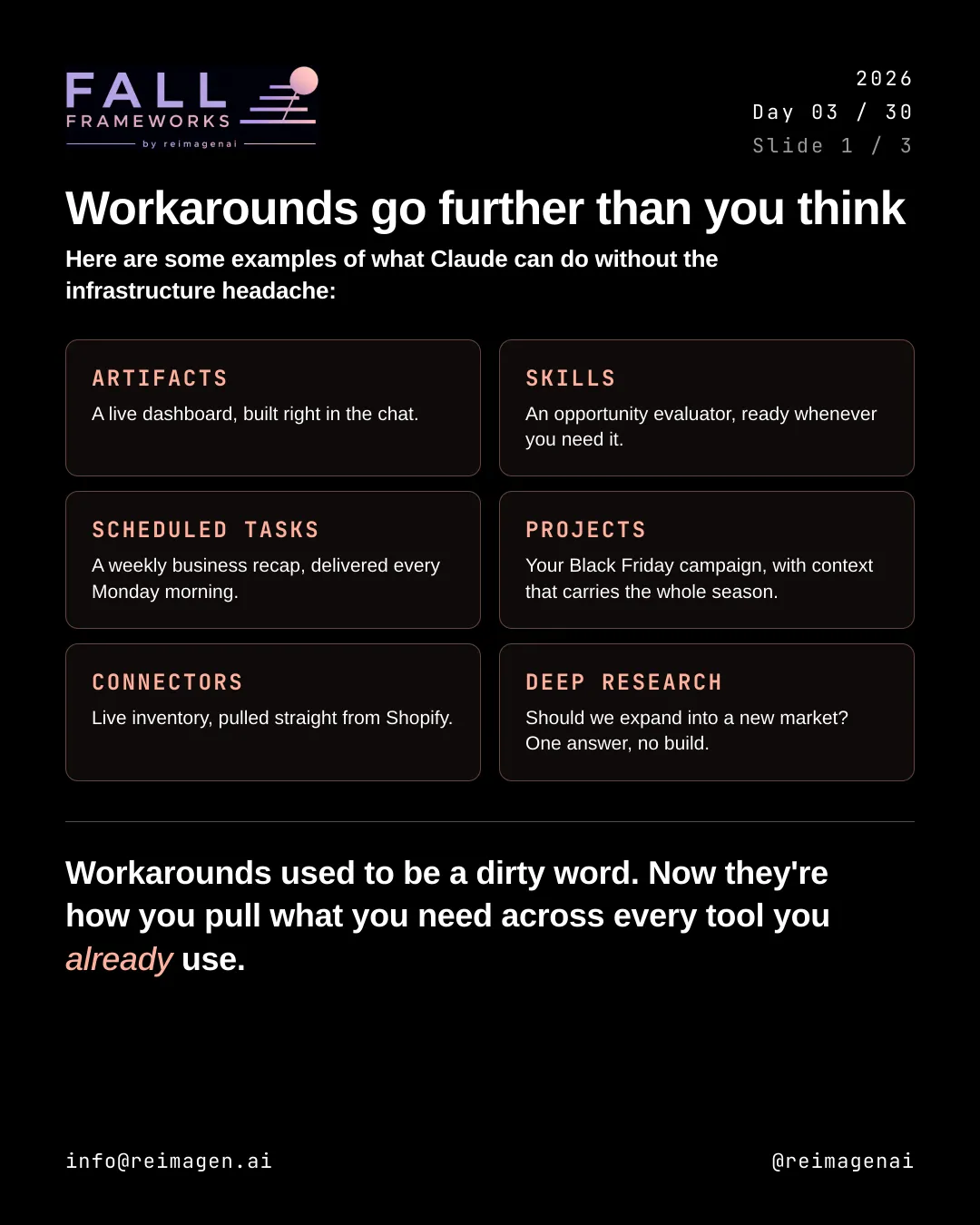
Workarounds go further than you think. Here are some examples of what Claude can do without the infrastructure headache:
Artifacts
A live dashboard, built right in the chat.
Skills
An opportunity evaluator, ready whenever you need it.
Scheduled tasks
A weekly business recap, delivered every Monday morning.
Projects
Your Black Friday campaign, with context that carries the whole season.
Connectors
Live inventory, pulled straight from Shopify.
Deep research
Should we expand into a new market? One answer, no build.
Workarounds used to be a dirty word. Now they're how you pull what you need across every tool you already use.
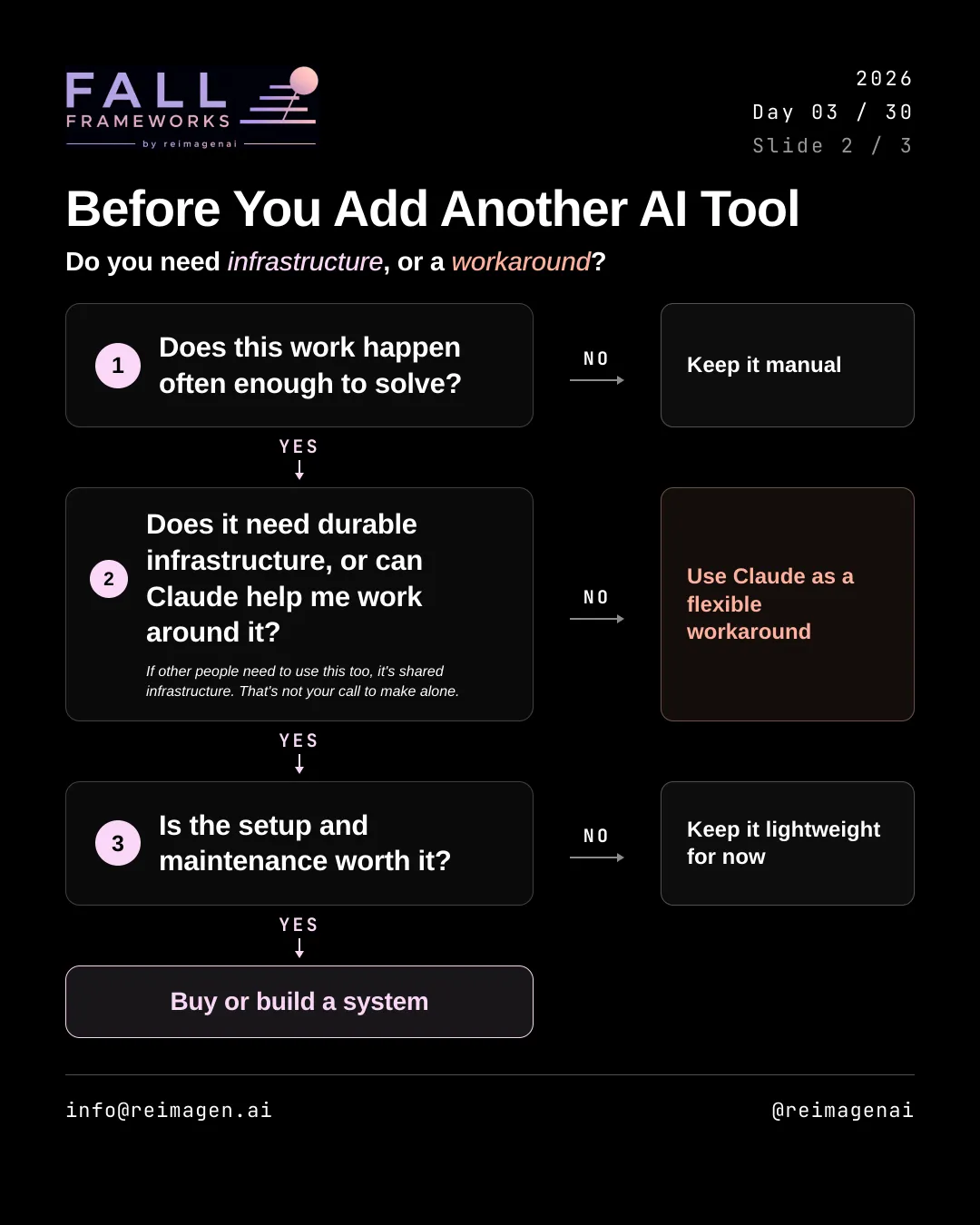
Before you add another AI tool: do you need infrastructure, or a workaround?
Does this work happen often enough to solve? No: keep it manual. Yes: next question.
Does it need durable infrastructure, or can Claude help me work around it? If other people need to use this too, it's shared infrastructure. That's not your call to make alone. No: use Claude as a flexible workaround. Yes: next question.
Is the setup and maintenance worth it? No: keep it lightweight for now. Yes: buy or build a system.
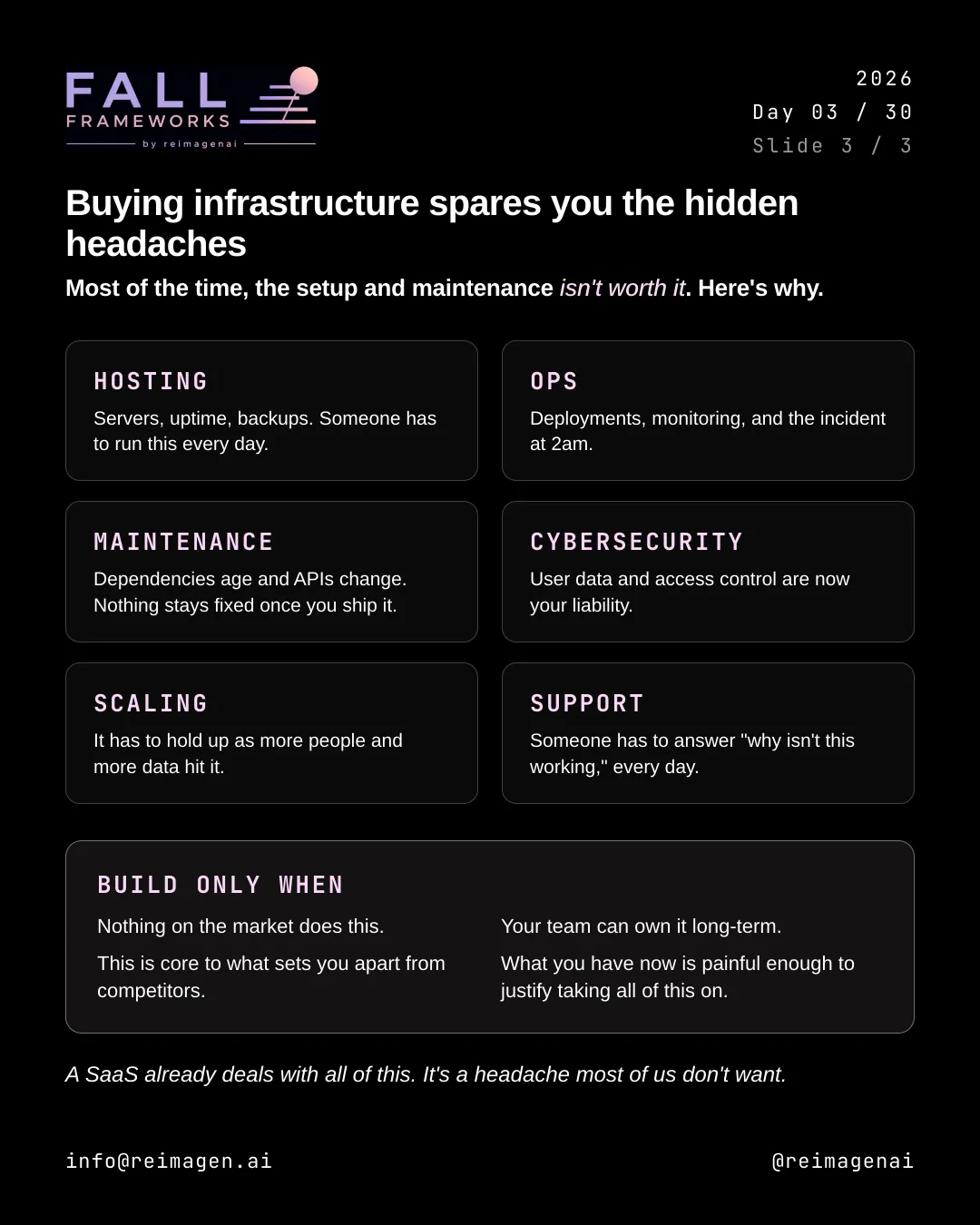
Buying infrastructure spares you the hidden headaches. Most of the time, the setup and maintenance isn't worth it. Here's why.
Hosting
Servers, uptime, backups. Someone has to run this every day.
Ops
Deployments, monitoring, and the incident at 2am.
Maintenance
Dependencies age and APIs change. Nothing stays fixed once you ship it.
Cybersecurity
User data and access control are now your liability.
Scaling
It has to hold up as more people and more data hit it.
Support
Someone has to answer "why isn't this working," every day.
Build only when:
Nothing on the market does this.
This is core to what sets you apart from competitors.
Your team can own it long-term.
What you have now is painful enough to justify taking all of this on.
A SaaS already deals with all of this. It's a headache most of us don't want.
Workaround example: custom dashboards. You're not escaping your team's favorite tools anytime soon. The same goes for clients and external partners. Slack, Notion, Google Drive, and the rest are part of the collaborative ecosystem, whether anyone enjoys every notification, channel, or nested page.
Build around the tools people already use. Reimagen uses Claude artifacts, skills, and scheduled tasks to turn existing workspaces into daily chat summaries and project-status dashboards. Collaborators keep the familiar surface. Reimagen removes some of the friction behind it.
Infrastructure example: Reimagen's video generation pipelines. The studio's production workflows need to call video APIs, control permissions, define what Nous Research Hermes can do, and drop assets into the right drives.
No existing tool does all of that efficiently, evolves at the speed the work requires, and connects to every production partner. The infrastructure comes with hosting, operations, maintenance, cybersecurity, and support. For this work, the headache earns its keep.
The first problem needs a better layer on top of existing tools. The second needs durable infrastructure because the work cannot happen without it.
Workaround First: ask these three questions before buying or building infrastructure:
Does the work happen often enough to solve?
Does it require durable infrastructure?
Is the setup and maintenance worth it?
If the answer to all three is yes, infrastructure is worth considering. If not, use the workaround.
Start with the tools already in place. Take on infrastructure when the work pays for the headache.
Run the Trust Surface Test Before Agents Touch It
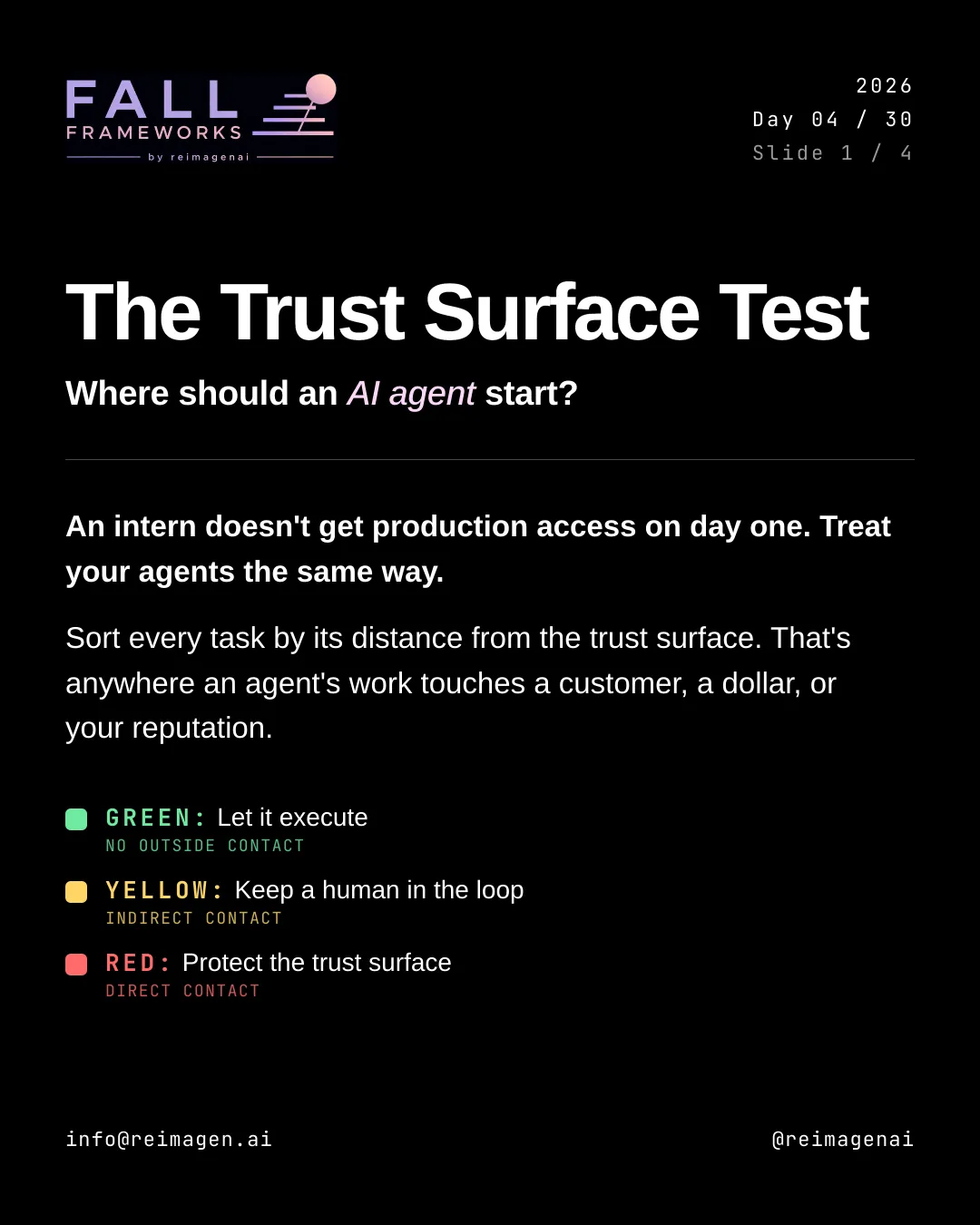
An intern doesn't get production access on day one. Treat your agents the same way.
Sort every task by its distance from the trust surface: anywhere an agent's work touches a customer, a dollar, or your reputation.
4 slides, swipe for more
The Trust Surface Test: where should an AI agent start? An intern doesn't get production access on day one. Treat your agents the same way. Sort every task by its distance from the trust surface. That's anywhere an agent's work touches a customer, a dollar, or your reputation.
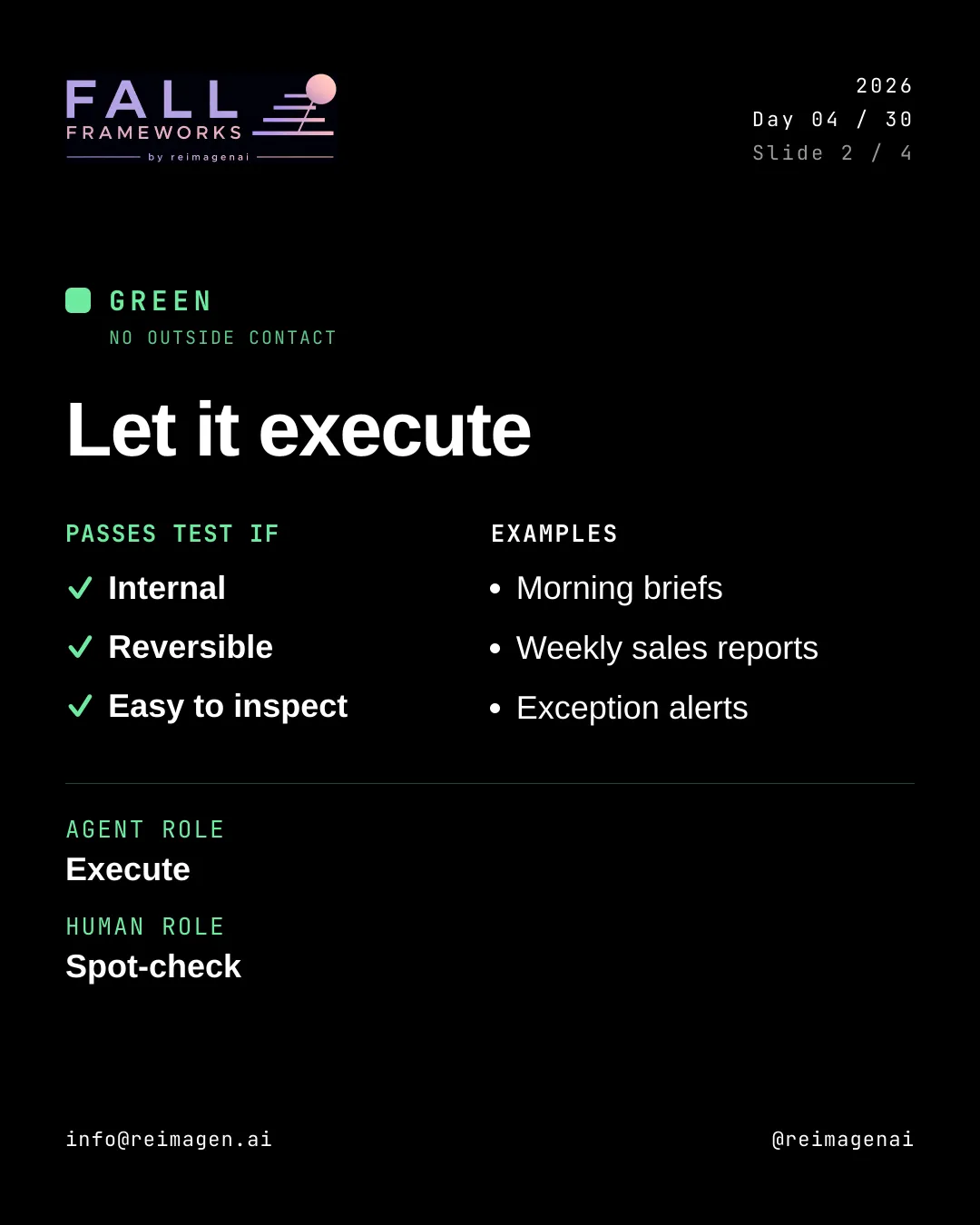
Green · No outside contact
Let it execute
Passes the test if it's internal, reversible, and easy to inspect. Examples: morning briefs, weekly sales reports, exception alerts. Agent role: execute. Human role: spot-check.
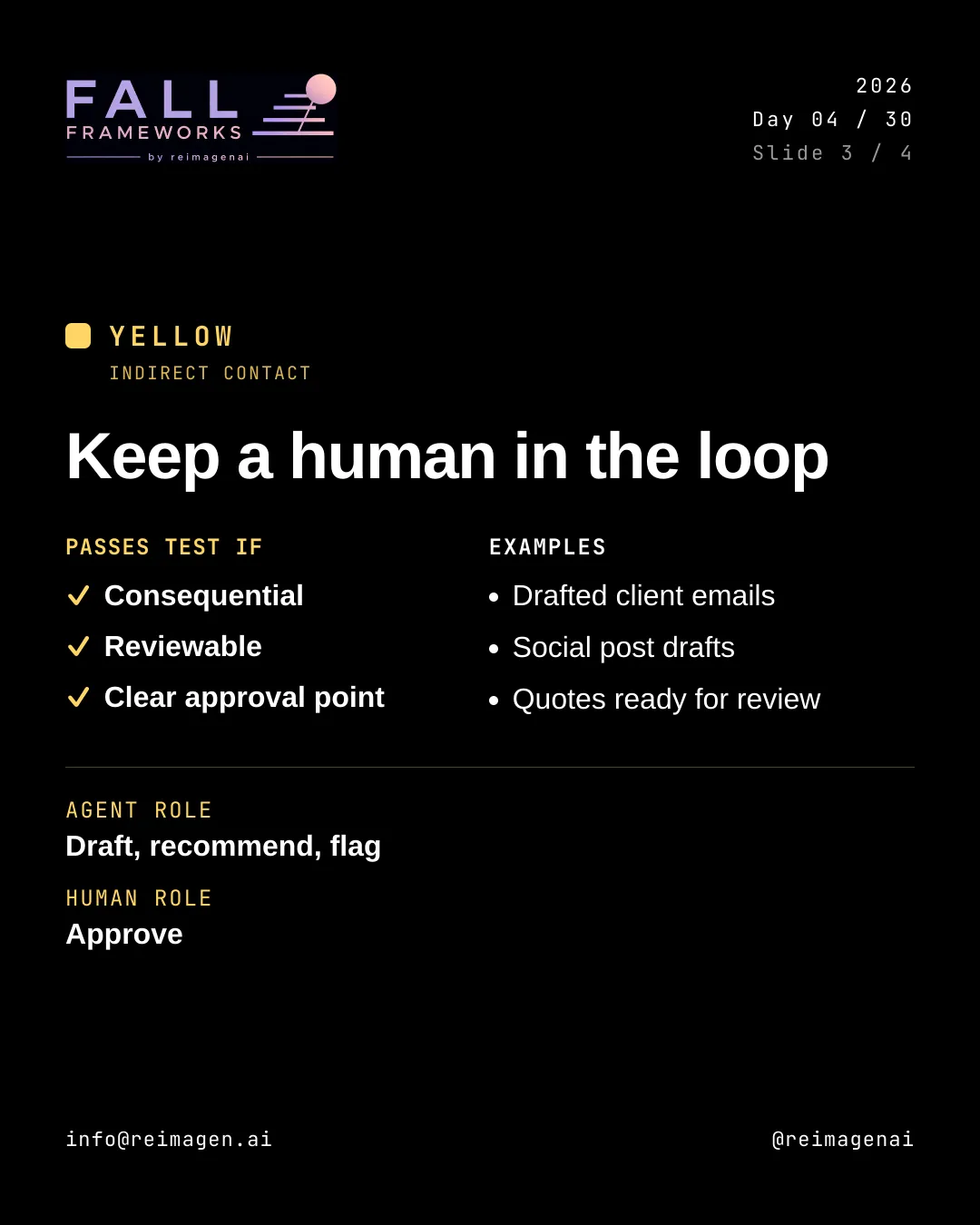
Yellow · Indirect contact
Keep a human in the loop
Passes the test if it's consequential, reviewable, and has a clear approval point. Examples: drafted client emails, social post drafts, quotes ready for review. Agent role: draft, recommend, flag. Human role: approve.
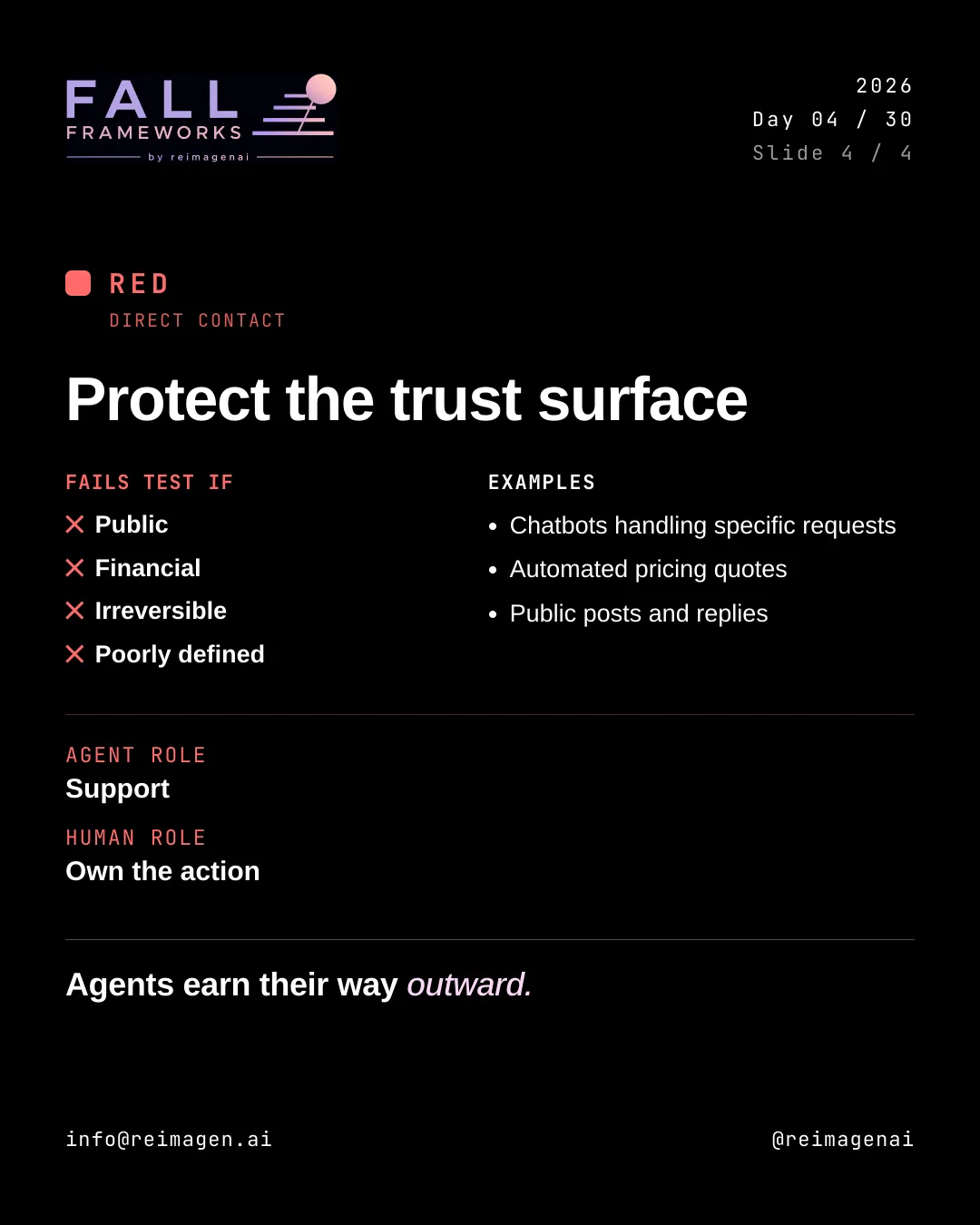
Red · Direct contact
Protect the trust surface
Fails the test if it's public, financial, irreversible, or poorly defined. Examples: chatbots handling specific requests, automated pricing quotes, public posts and replies. Agent role: support. Human role: own the action.
Agents earn their way outward.
Agent rollouts fail when teams start with red tasks.
Reimagen's pilot concept Silicon Alley shows how this goes. Brad, in full AI psychosis, decides he needs an army of agents. Great idea, until Brad creates 50 new failure points. His AI assistant Kevin gets a vague mandate and spins up toddler bots. They have no clear job, no model of good, and no idea when to ask for help. Kevin crashes out.
Real agent rollouts follow the same pattern. Companies put agents on customer-facing work before they have proven themselves internally. The agent does not know the team's process, taste, approval rules, or edge cases. The result reaches the public, and a human still owns the consequences.
Run every task through the Trust Surface Test:
Does the output touch a customer, a dollar, or the company's reputation?
Can the action be reversed before it causes damage?
Is there a clear approval point and a person who owns the call?
Then route it:
Green: The agent executes. A human spot-checks.
Yellow: The agent drafts. A human approves.
Red: The agent supports. A human owns the action.
Agents earn more access after they prove themselves on lower-risk work. Fifty poorly scoped agents still create 50 headaches. Save Kevin. Save yourself.
Watch Silicon Alley below.
Silicon Alley
Are You Solving the Problem, or Throwing AI at It?
The trap: treating AI like duct tape.
A team has a marketing, sales, or ops problem. Nobody owns it, and nobody wants to. Enter AI hype, which says the solution is an agent. Instead of solving the problem, you gave it a new login.
Now the process cranks out expensive slop:
A vague intake process powers an agent that confidently produces bad outputs.
A missing decision owner ends with five people blaming AI or each other for the wrong call.
An undocumented workflow is still a black box. You can see you're failing, but not why.
A role nobody has the expertise to evaluate gets filled with material nobody can tell is bad.
The Duct Tape Test: before you add AI, answer these:
What decision needs to happen?
What information is needed to make that decision?
Who can tell a good outcome from a bad one?
Who owns the call when the answer is unclear?
What are the edge cases?
Where does the work go when it hits an edge case?
In practice: Reimagen runs Nous Research Hermes gatekeeper agents in dedicated Slack channels to evaluate new opportunities for compatibility and business value. They flag promising fits and route everything else to the waiting list. The call on what moves past "promising" stays human.
That decision needs context about the business, the workflow, the cost, and what good looks like, all documented across Reimagen's Obsidian vault, Google Drive, and Notion. The agents help assess. A human makes the call.
AI saves time by analyzing against the parameters you provide and extending expertise that already exists. It cannot create the judgment needed to supervise work you don't understand. Hire AI into a role nobody owns or knows how to evaluate, and expect slop.
What Should You Give AI?
Which parts of the work stay human when AI can make all of it?
Reimagen competed in the Los Angeles stop of the AI Creative Challenge, hosted by The One Club for Creativity x Google. Eight of LA's top AI creators, ten-minute rounds, one-on-one showdowns, best video wins.
Reimagen's run was sponsored by Topview, with Topview AI Canvas as the production environment for all three rounds.
Each round is a framework disguised as a creative brief: what stays human, what AI gets, and what can be cut when the clock is running.
Human Direction Moves Faster Than AI Guessing
Round 1 brief: make a trailer for an action movie starring a grandmother.
The framework behind the entry, Direction First:
Bring the vision. Start with a concept grounded in scenes, culture, and details you know.
Build the invisible workflow. Give the agent the skills, production rules, and handoff format before the clock starts.
Use voice to move at the speed of thought. Talk through the concept while the agent turns it into structured production direction.
Let the agent lock down the cinematic vocabulary. Narrow the directors, references, camera language, and visual style needed to express it.
Provide the judgment. Validate the references and reject anything that only seems right.
Let the models bring it to life. Once the direction is locked, hand off generation and assembly.
In practice, the concept came to mind immediately: a Hong Kong grandmother action hero, slow-motion projectile dumplings, a dramatic flaming-wok moment, a giant cleaver, then back to folding dumplings like nothing happened.
It drew on real scenes: eating at Chinese restaurants growing up and past trips to Hong Kong. Roast ducks hanging in the glass. A giant chopping block. An uncle in a white tank going to town with a cleaver, probably with a cigarette in his mouth.
The vision was there. The exact cinematic vocabulary did not need to be.
For the first five minutes, the screen share looked like nothing was happening. Every other competitor was typing into the production interface. Lisa was the only person speaking into a phone.
Voice was the interface. ChatGPT already held the model-specific skills, prompt structure, and production requirements. By the time Topview AI Canvas opened, the production handoff was ready to copy and paste.
The workflow looked lighter because the preparation was heavier.
Inside that conversation, the agent narrowed the options, surfaced relevant Hong Kong directors and film references, and translated the direction into visual language the production models could use. Each reference still needed a human judgment call: does this sharpen the vision, or pull it somewhere else?
Authenticity is felt when the direction comes from scenes you know well enough to validate. "Seems right" is not a creative standard. Round 1: W.
Watch Grandma's Got This below.
Grandma’s Got This
Know What to Skip
Round 2 brief: make a tourism ad for the bottom of the ocean.
The framework behind the entry, The Skip List:
Name the audience reaction. Should they laugh, feel awe, get curious, or remember something?
Find the hero beat. Identify the moment that creates that reaction.
Direct that moment precisely. Define the framing, camera movement, scale, and reveal.
Let VFX carry the impossible. The audience needs visual logic strong enough to follow.
Cut anything that does not strengthen the reaction.
In practice, the goal was curiosity, followed by a visual wow.
Reimagen specializes in social, which makes being chronically online market research. So the casting was obvious: Gerald the dolphin.
For the non-doomscrollers: a Florida man was (allegedly) kidnapped by a dolphin named Gerald who wanted help building an underwater city. The internet lost it. Memes, conspiracy theories, people asking what the dolphins know that humans don't. Naturally, Gerald became the tour guide for the lost city of Atlantis.
A talking dolphin is already impossible. A human surviving at that depth with a snorkel is impossible. The audience understands the joke without a character sheet or an explanation.
Gerald and the surfer were the connective tissue. The Atlantis reveal carried the spectacle. That was where the direction went: the camera approach, the scale of the city, the underwater atmosphere, and the moment the mystical world opened up.
A tourism ad has one question to answer: do you want to go now? If Gerald is your guide and Atlantis is the destination, obviously yes. Round 2: W.
Watch Gerald's New Job below.
Gerald’s New Job: Atlantis Tour Guide
Make It Weird Enough to Stop the Scroll
Final round brief: make an ad for a gym where nobody can exercise.
The framework behind the entry, The Scroll-Stopper Test:
Start with a familiar visual language. Give the audience a format it recognizes immediately.
Introduce one clean twist. Push the familiar premise somewhere the audience has not seen.
Direct from lived experience. Use details you know well enough to make specific and validate.
Build a distinct visual style. Decide which textures, movements, colors, and close-ups make the world feel real.
Test the reaction. Did it stop the scroll, and will it stay in their head?
In practice, the answer was FACEGYM: never skip face day. Years of breathwork and trying wild skincare treatments supplied the treatment vocabulary. Mewing became training. Skincare became recovery. A Saratoga Spring Water Company-style ice bath led into infrared therapy, steam, and sculpting tools.
The visual direction started with a familiar format: a deadpan, neon 1980s workout infomercial. Men in neon unitards, puffed cheeks, O-mouths, and exaggerated jaw movements pushed it somewhere new. Close-ups of skin texture, visible pores, and natural facial movement made the ridiculous premise feel plausible enough for a double take.
ChatGPT Voice helped lock the aesthetic and sequence. Topview AI Canvas ran Seedance 2.5 at both 25 and 30 seconds to see where the beats needed more room.
Favorite judge note of the night: "Unfortunately, that visual is going to stick in my head for weeks." Job done. Whether you like it is a separate Know Your Audience call.
Two other judges landed on "technically, facial exercise is still exercise." TikTok calls it looksmaxxing, mewing, and mogging. Nobody's logging it on Strava (hopefully). FACEGYM calls its facial services "workouts." Anyone who has spent $200 getting their face rolled, sculpted, and depuffed would tell you the experience is 100% spa.
Reimagen took 67% of the audience vote and lost 4–3, because the judges' votes outweighed the crowd's. Round 3: L. Still walked out the people's princess.
Watch Face Gym below.
Face Gym: Never Skip Face Day
Direction > Generation
What tied all three rounds together: every creative direction decision was human.
The brief dropped, Reimagen decided what to make, then used the fastest tools to get there in ten minutes.
Round 1: Hong Kong Grandma in sunglasses at night. Frozen dumplings as weapons. Giant cleaver. Take care of business. Back to folding dumplings.
Round 2: Gerald the dolphin. Oblivious surfer. Atlantis.
Round 3: FACEGYM. 80s aerobics. Mewing. Breathwork faces. Skincare as recovery. Weird enough to stop the scroll.
None of these choices came from the model.
Could Reimagen have YOLO'd the brief? Absolutely. Nous Research Hermes runs custom video pipelines Reimagen runs from Slack and the CLI. The one-sentence brief could have gone straight to the agent to concept, storyboard, prompt, generate, and hand back a finished video.
Being able to make a video and being able to make a good video are two separate skills. Without a strong perspective, you're pulling the AI slot machine: the model picks the concept, references, story, and aesthetic, and you see what comes back. Usually slop. A beautifully rendered combination of things you've already seen, and pretty slop is still slop.
Direction > Generation: the division of labor:
Human: pick the destination. Define what good looks like.
Human to AI: here's the map, the context, and the guardrails.
AI: find the best route. Execute, fast.
Human: judge how good the result is.
No human has the computational power to explore every route, and there's no reason to micromanage the part AI does faster. But concept, perspective, cultural references, jokes, and pacing are creative direction. That stays human.
The same framework applies to almost any agent workflow. When someone says an agent gave them mediocre work, the first question is some version of: did you tell it where to go, or did you let it decide that too?
Build for How You Work
Testing every new tool, or the ones that fit the work?
Reimagen runs strange experiments before the client brief arrives, so when someone asks "can we make this?" there is already an answer.
These frameworks cover how to test on purpose, how to read an agent's choices against your own, and how to pick a tool when there is no single best one.
Generate Wide. Execute Narrow.
The worst place to discover where an idea breaks is on a client's dime, with a deadline breathing down your neck.
Use AI to generate wide while the stakes are low.
Generate Wide, Execute Narrow:
Generate wide. Pick ideas that each test a different failure point, before any client brief.
Map what held. Note where the output holds up, where it gets fragile, and what needs a different approach.
Execute narrow. When the brief arrives, build on the path you already tested.
The test case: Prime Time Plumage, a lost 1990s dance competition starring photorealistic birds, built to test solo performance, group choreography, species-specific movement, realism, and continuity.
Could a rare, exotic bird carry a courtship ritual reframed as modern dance? Surprisingly, yes. Mixing species held up, and so did group routines: the blue-footed booby dads on tap looked decent.
Could a flamingo troupe hit synchronized 80s jazzercise choreography? Absolutely not. The flamingos looked unmistakably fake. Complex choreography was the breaking point.
It was also the first run with Dreamina's newer agent. Its predecessor, Octo (since shut down), burned credits and dropped references. The new one waits for approval before generating and keeps context (to a point).
Now there's a map: where individual animal performance holds up, where group choreography gets fragile, which ideas work in photorealism, and which need a stylized treatment or a different approach entirely.
Watch Prime Time Plumage below.
Prime Time Plumage: A 1990s Dance Competition Starring Birds
Your Agent Has Bias. So Do You.
Every model choice comes from a default. Let an agent make the picks and you see its defaults and your own.
The agent picks from the models, information, and framework it has. You pick from experience, preferences, and production priorities. Neither is neutral.
The Bias Check Test:
Give the agent no model direction. Let it choose on a low-stakes project.
Compare its picks to yours. Note every place it chose differently.
Sort the differences. Some expose your blind spots. Some expose what the agent doesn't know yet.
The test case: Betty Boot, built in a cardboard paper-cutout world by fal's agent with no model direction from Reimagen. The agent chose:
Nano Banana Pro/Edit over GPT Image 2.
Veo 3.1, which is expensive and rarely Reimagen's first stop.
Seedance 2 instead of the newer Seedance 2.5.
That exposed some blind spots. Maybe Nano Banana Pro/Edit was the better fit. Maybe GPT Image 2 is the default because Reimagen knows how to get exactly the right result from it.
Seedance 2.5 would likely have outperformed Seedance 2 here. The agent's framework may not have had enough information about the newer model yet.
Some of the agent's picks made the final cut. For the shots that didn't work, Reimagen went back to the trusty steeds: GPT Image 2 and Seedance 2.5.
Watch Betty Boot below.
Betty Boot Has Had Enough
Exploration Mode Is Not Execution Mode
"We have a crazy idea and a short production timeline. Can AI help us pull it off?"
There's almost never a proven playbook for that call. Traditional production has known costs and known constraints. The GenAI goalposts move too fast for that, so the work is asking "what if," pushing the idea farther, and finding another route when the obvious one fails.
So Reimagen side-quests intentionally: hackathons, workshops, unhinged vibe-coded apps, agent framework tests, and weird creative experiments. Each one starts with something Reimagen wants to learn: what a new model can carry, where an agent workflow breaks, which interface speeds up the work. The experiments that work earn a place in the agentic pipelines Reimagen runs on, so client work flows through systems that have already been put through the wringer. When the crazy idea with the short timeline comes in, Reimagen can drop into the slipstream, fire up a production path that's already been tested, and help it land.
And yes, some side quests happen because they sound fun. This is a creative business, and creative plus AI needs room to play at the edge.
You don't need to try every new tool. The Side-Quest Rules: start with what you want to learn, ideally something adjacent to a real problem you already have:
Name the question. What do you want to learn that you can't currently answer?
Pick the tool to test it. One unfamiliar tool, model, or approach that could answer it.
Cap it. Set a time and budget limit.
Write it down. What worked, what failed, and where human judgment was needed.
Promote only what's proven. Move those pieces into your real workflow.
That is the line between exploration and execution.
Explore far enough outside your defaults to learn something new. Then come back with evidence and choose the route you can trust.
How Do You Know Which AI Tool to Use?
There is no single best AI tool.
Goal-First Tool Choice: before choosing or committing to a tool, ask:
How does the tool enter the workflow? Are you choosing it, is it part of the assignment, or is testing it the opportunity?
Is it compatible with your existing system?
What job does it need to do?
What are you optimizing for? Quality, speed, cost, control, context, or reliability?
How will you know if it's working?
When should your judgment override the tool?
The first question decides the rest. One week of projects gave three different answers.
Experiment with wearable AI. At the OpenAI x AI Tinkerers "Agents, Everywhere" hackathon, the tools were part of the assignment. Sponsors chose the stack, and about half of it sat outside Reimagen's usual pipeline. The build was a live AI social copilot for smart glasses, made in four hours by a team of four. With no time to master every tool, the move was to jump in, trust existing skills, and figure out how the pieces fit together.
Push for edge cases. Through Reimagen's Dreamina partnership, the tool was already chosen. The job was to understand its strengths and push its newest agent. Prime Time Plumage found the line: mixed species held up, complex choreography did not. When a tool is already in front of you, it's on you to learn where it performs and where it breaks.
Test a frontier agent. Testing fal's agent was the opportunity. On Betty Boot, it made model choices across image generation, editing, and video. Some exposed Reimagen's own bias. Others needed a human to step in with newer information or production judgment. With frontier tools, part of the experiment is knowing whether the process is going well, drifting off course, or needs to be stopped and restarted.
Sometimes the skill is choosing the right tool. Sometimes it's maximizing the one already in front of you. And sometimes it's knowing when to take the wheel back.
Hand Off the Work Nobody Wants to Do
Is work falling through the cracks while you shop for agents?
These five frameworks run one handoff end to end: find the leak, check that the task is ready, hand it off, stop at good enough, keep the thinking, and test whether the handoff worked.
Fix the Cracks Before You Add Capabilities
Your business has work falling through the cracks.
Follow-ups get dropped.
Meeting notes never turn into tasks.
Research and half-baked ideas get buried.
Information lives in ten different places.
You know these problems exist, but fixing them takes tedious work: identifying what keeps breaking, defining how it should work, and cleaning up the mess.
2 slides, swipe for more
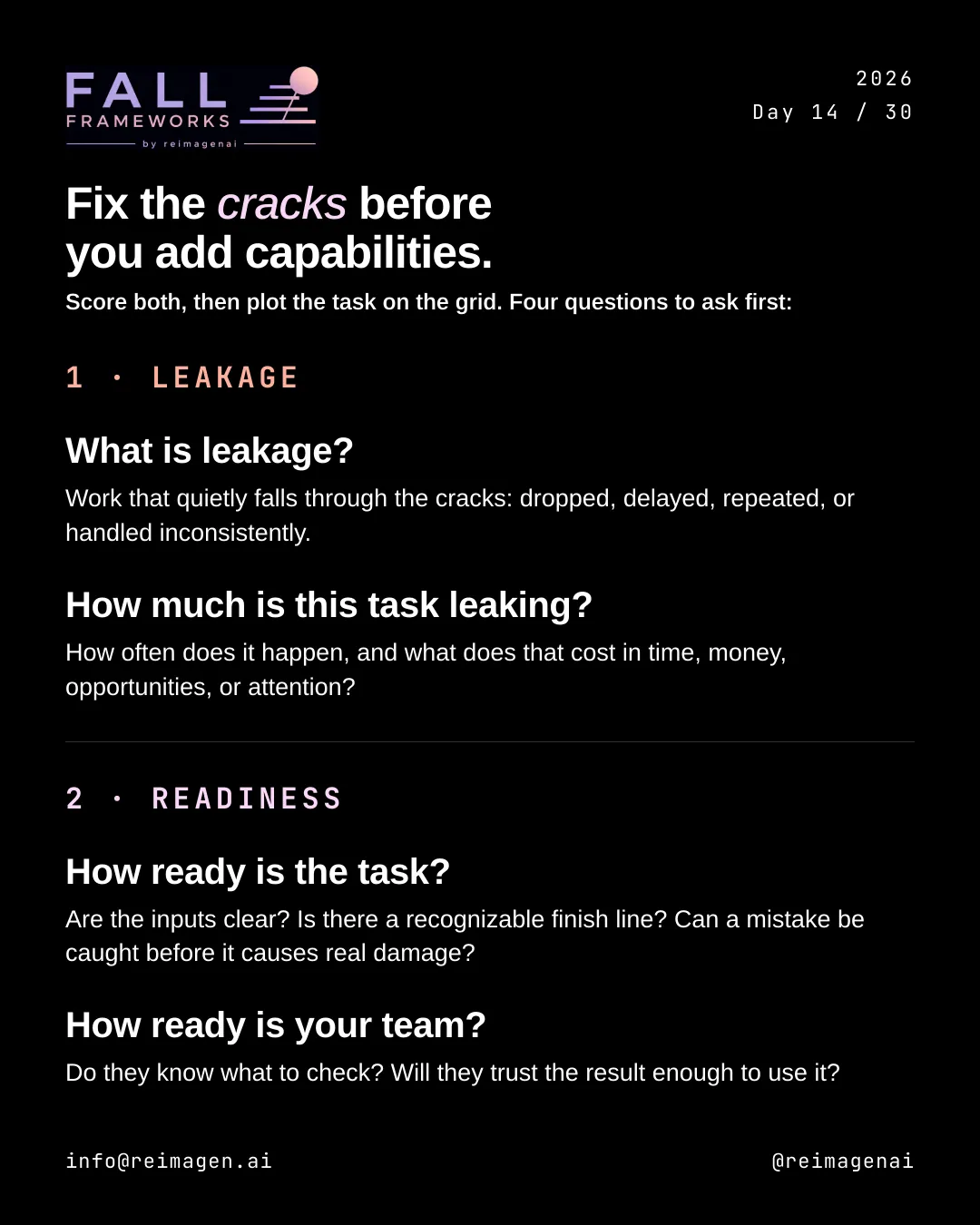
Fix the cracks before you add capabilities. Score both, then plot the task on the grid.
Leakage
How much is this task leaking?
Work that quietly falls through the cracks: dropped, delayed, repeated, or handled inconsistently. How often does it happen, and what does it cost in time, money, opportunities, or attention?
Readiness
How ready is it to hand off?
Are the inputs clear? Is there a recognizable finish line? Can a mistake be caught before it causes real damage? Does your team know what to check, and will they trust the result enough to use it?
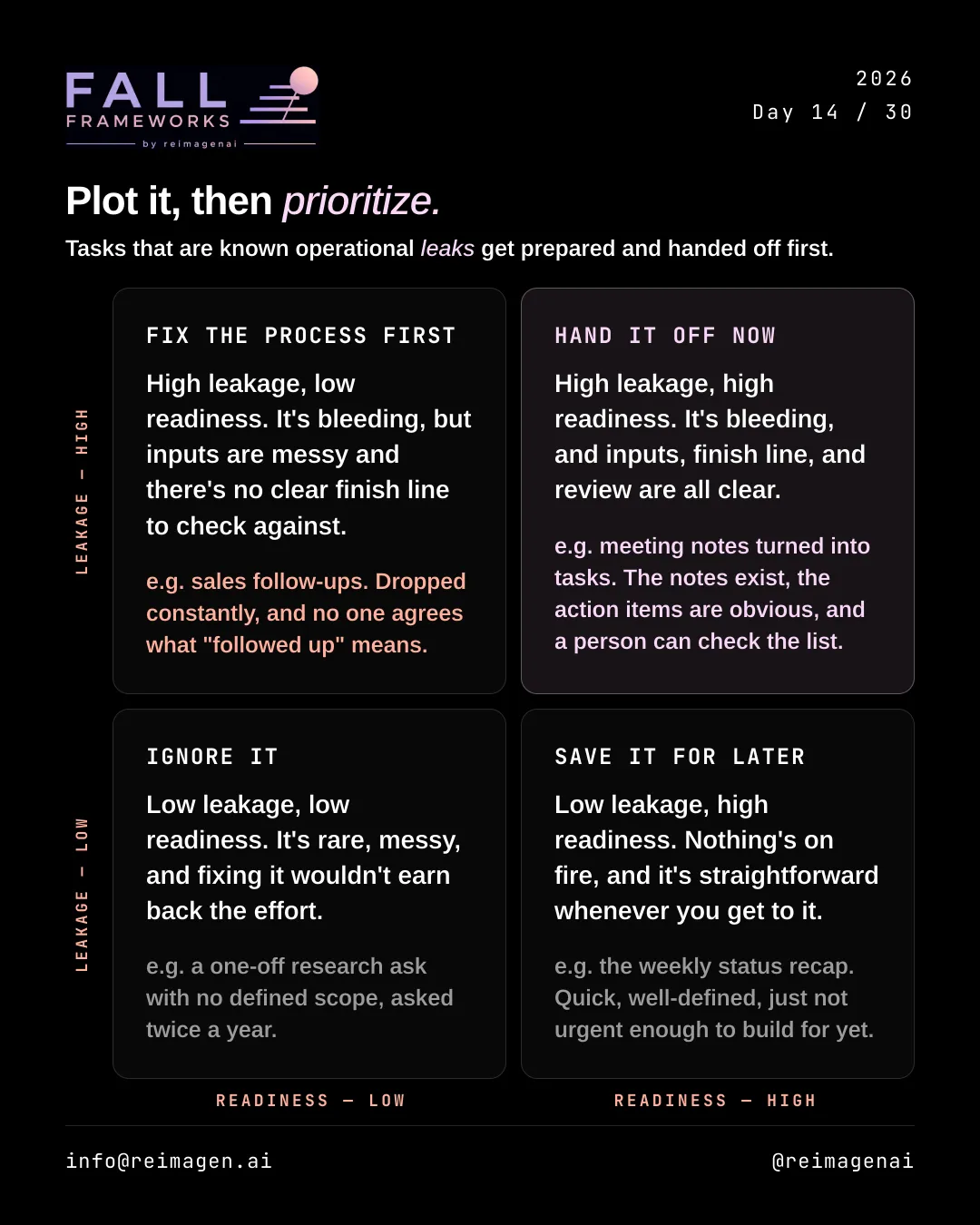
Plot it, then prioritize. Tasks that are known operational leaks get prepared and handed off first.
High leakage · High readiness
Hand it off now
It's bleeding, and the inputs, finish line, and review are all clear. Example: meeting notes turned into tasks. The notes exist, the action items are obvious, and a person can check the list.
High leakage · Low readiness
Fix the process first
It's bleeding, but the inputs are messy and there's no clear finish line to check against. Example: sales follow-ups. Dropped constantly, and nobody agrees what "followed up" means.
Low leakage · High readiness
Save it for later
Nothing's on fire, and it's straightforward whenever you get to it. Example: the weekly status recap. Quick, well defined, not urgent enough to build for yet.
Low leakage · Low readiness
Ignore it
It's rare, messy, and fixing it wouldn't earn back the effort. Example: a one-off research ask with no defined scope, asked twice a year.
Meanwhile, every AI company has a shiny new capability to sell. A sales agent, a marketing agent, an AI Chief of Staff, and a whole team of bots before lunch. Brad tried that in Silicon Alley, Reimagen's pilot from Day 4, and ended up with 50 new failure points.
None of the shiny tricks fix the work you're already dropping. Before you add another agent, list the operational leaks in your business, score each one on leakage and readiness, and plot it on the Leakage and Readiness Grid. You'll see what to hand off now, where the process needs work first, and what isn't worth solving. Stop the hemorrhaging. The bells and whistles can wait.
Hand Off Research and Analysis
Planning around conferences is tedious work nobody wants to do.
You have to dig through the agenda and side events, research hosts and speakers, track event approvals, compare locations, catch conflicts, then decide how to spend your time. The scale for the back-to-back LA and SF Tech Weeks in October 2026:
LA Tech Week had 796 events.
The SF calendar looked roughly three times larger.
Nobody is sorting through several thousand event listings by hand, so the job went to Nous Research Hermes.
On the leakage and readiness grid, this task is high leakage, because conference planning is easy to let slip and painful to execute badly. It's high readiness, because the context, criteria, and desired output were already defined.
The Research Handoff was set up in four steps:
Load the context. Reimagen's Obsidian vault already holds the studio's priorities, projects, partners, and relationships. Hermes also got the events Reimagen was hosting or already committed to.
Define the output. A strategic coverage report and spreadsheet auditing each city's events: a proposed schedule, registration statuses and conflicts, target partners covered each day, and the reason each event might be worth the time.
Make the agent argue. Every recommendation needs a reason. Hermes has to make the case that an event belongs on the calendar. Day 26 lays out the four questions that decide whether an event is worth it.
Keep the decision. Hermes does the research and the first-pass recommendation. A human decides where to show up.
Know When to Stop Optimizing
There's an old joke that an engineer will spend two weeks automating a task that takes five minutes by hand.
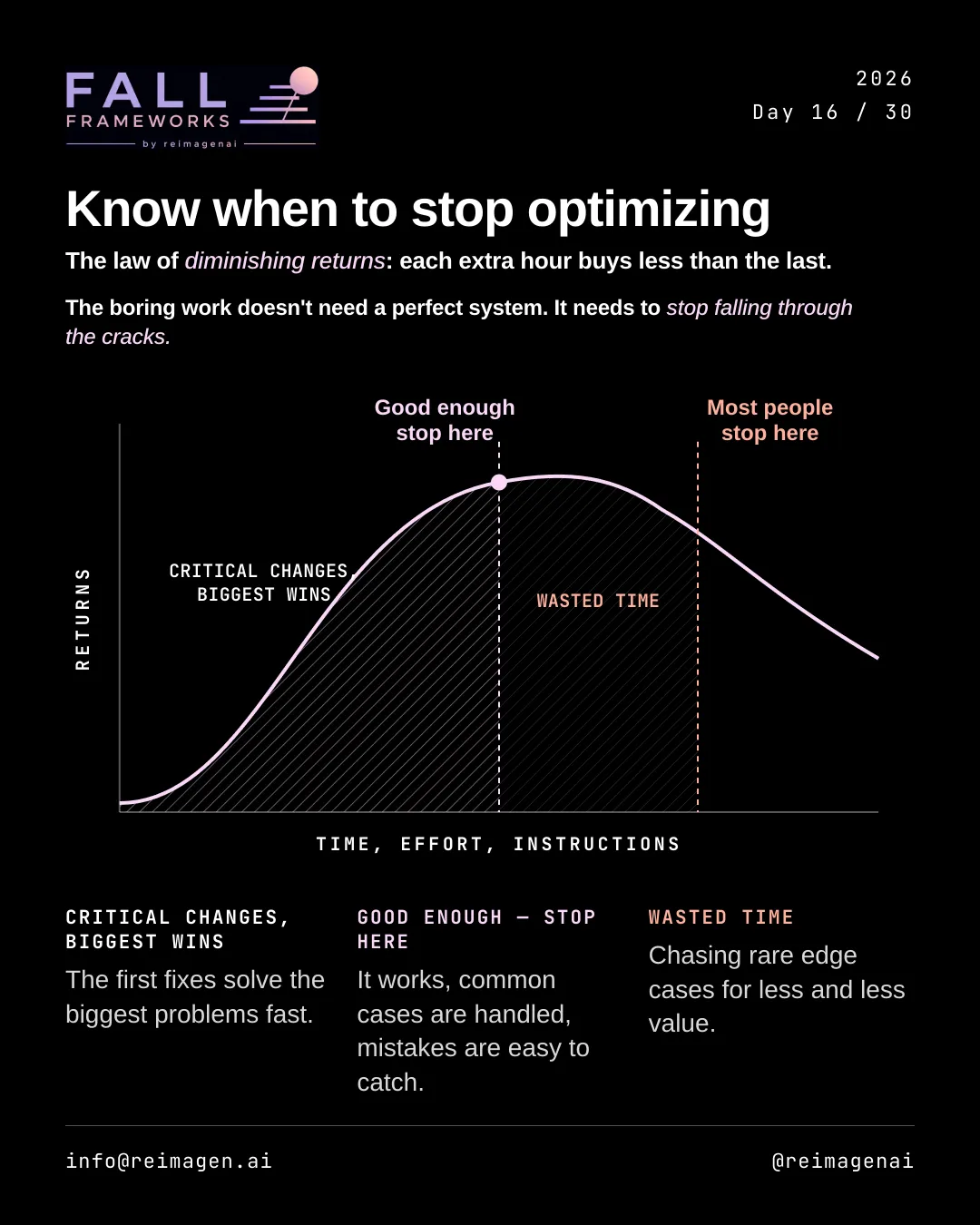
Behind the joke is the law of diminishing returns: each extra hour buys less than the last. The first few changes solve the biggest problems. After that, you spend more and more time on rarer edge cases for less and less value.
Critical changes
Biggest wins
The first fixes solve the biggest problems fast.
Good enough
Stop here
It works, common cases are handled, and mistakes are easy to catch.
Wasted time
Where most people stop
Chasing rare edge cases for less and less value.
This is an easy trap with workflows and agents. You build v1, then keep adding instructions, integrations, routing, memory, and error handling because the workflow could always be better.
When you're handing off work nobody wants to do, aim for good enough. The Good-Enough Test:
It gets done consistently.
The output goes to the right place.
The common cases are handled.
Mistakes are easy to catch during review.
Expect to iterate after testing the workflow on real work, but fix the failures that happen often or cause meaningful problems. Protect your time and leave the rare, low-impact edge cases alone.
With tools like Claude, a few skills and artifacts usually do the job. Not every task needs a whole workflow built around it. That's how you end up two weeks deep in a process you won't even use.
You Can’t Hand Off the Thinking
Hand an agent the whole post and it can pick a thesis. Most of the time, the result is AI slop.
Reimagen is all for LinkedIn's "Seems Like AI Slop" button, and has been calling out lazy content since the AI Systems series. Copy-paste posts are easy to spot, especially now. Same format every time: canned hook, baited point, dramatic soliloquy, then an empty-yet-wordy close that sounds like a kid using fancy words they don't know the meaning of.
That's what happens when you outsource a nonexistent point of view to the world's fanciest Mad Libs engine.
The fix is the Ops/Thinking Split. Hand agents the content operations. Keep the editorial judgment: the thesis, the position, the examples, and the final call.
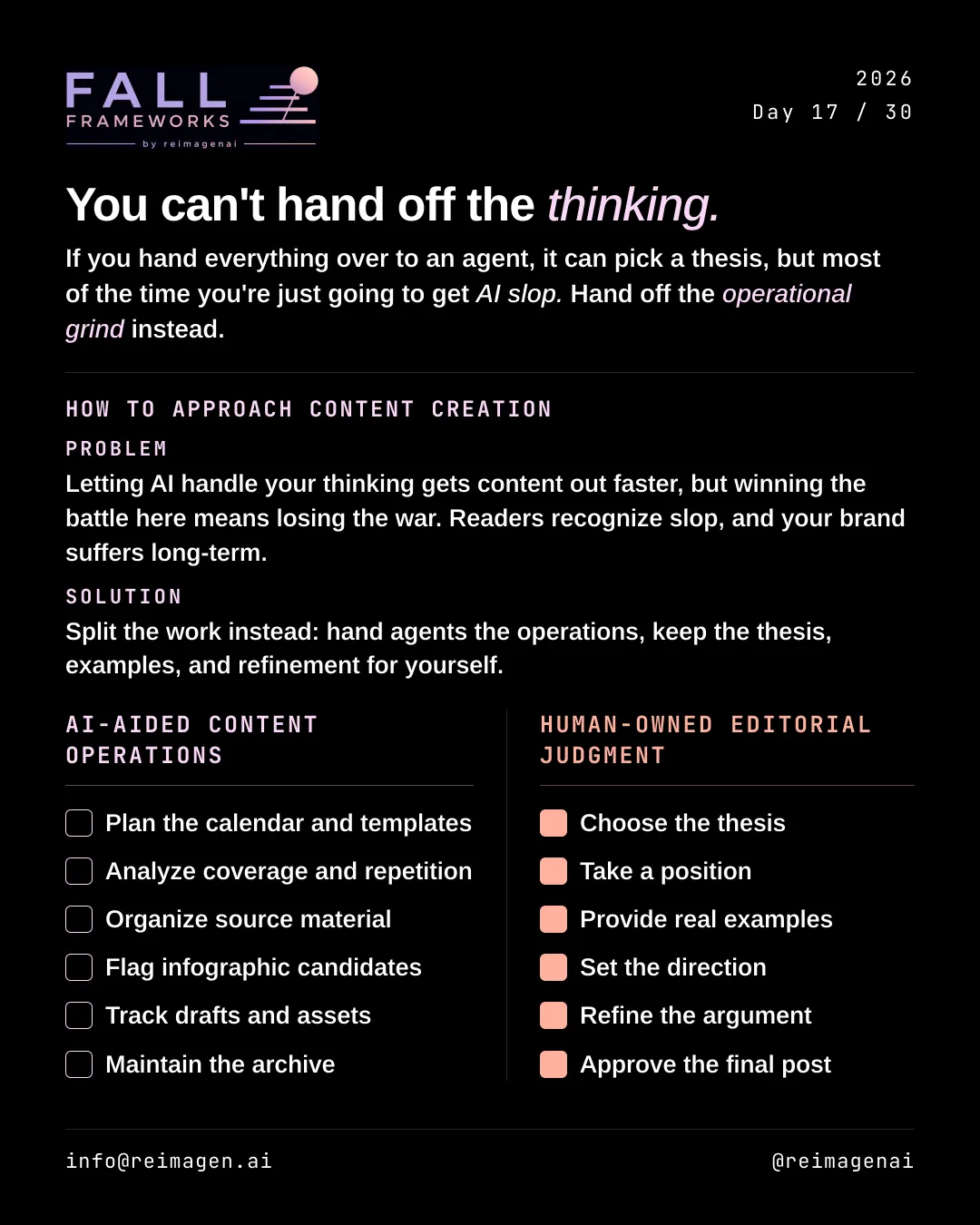
You can't hand off the thinking. If you hand everything over to an agent, it can pick a thesis, but most of the time you're going to get AI slop. Hand off the operational grind instead.
Problem
Faster content, weaker brand
Letting AI handle your thinking gets content out faster, but winning the battle here means losing the war. Readers recognize slop, and your brand suffers long-term.
Solution
Split the work
Hand agents the operations, keep the thesis, examples, and refinement for yourself.
AI-aided content operations:
Plan the calendar and templates
Analyze coverage and repetition
Organize source material
Flag infographic candidates
Track drafts and assets
Maintain the archive
Human-owned editorial judgment:
Choose the thesis
Take a position
Provide real examples
Set the direction
Refine the argument
Approve the final post
Reimagen uses AI, obviously. Every Fall Frameworks post was AI-aided, because there's plenty of operational content work nobody wants to do:
Scaffold topics across a 30-post series
Analyze themes, coverage, and repetition
Organize notes and source material
Assess which concepts need infographics
Track drafts, assets, and publishing status in the posting calendar
Maintain the strategy and writing archives in Notion
Agents are good at these jobs: ops, analysis, admin. Ship it off.
The thinking stays human. Every draft gets checked against a Voice.md file listing patterns to keep out of the writing, then refined until the point of view comes through. Go hands-off with the ops. Keep the thinking on your plate.
How Do You Know Your Agent Handoff Is Working?
An agent handoff works when it saves time, reduces pain, and stops the leak.
The Handoff Test: to check, compare:
Manual time: how long the task would have taken by hand
Overhead: time spent on setup, review, and corrections
Usefulness: whether the final output was useful
Error recovery: whether errors were easy to spot and fix
Mental load: whether the task took less mental energy overall
The test case: Reimagen's Tech Week planning from Day 15. It passed overall, though Hermes did not get it right on the first pass.
Final outcome: worth it. Without the agent: hours, maybe days, of event listings, agendas, host and speaker research, and schedule building. With it: pre-assembled reports with recommended events, conflicts, registration statuses, and the reason each event is worth the time.
The hiccup: on the first pass, the number of evaluated events looked suspiciously low. Hermes had only pulled the first page of results, because more load only as you scroll. Easy fix: go back and cast the wider net. But AI will confidently hand you a polished report that's incomplete or straight-up wrong. You're still accountable for the results.
The work still needed review, and a bad assumption still needed challenging. Reading thousands of events and assembling the calendar by hand did not. And now there's a repeatable process for conferences and events of any size.
Productive AI vs. Performative AI
Did AI finish the work, or move it to someone else's desk?
AI that gets work done looks different from AI that makes it look like more work got done. These frameworks put a report, a prototype, a custom stack, and a pile of generated ads through the same test.
Is Your AI Productive or Performative?
Did it solve the problem, or hide it somewhere else?
Signs your organization is LARPing AI transformation while the team quietly absorbs the cost:
You value tokenmaxxing.
You humblebrag about high-volume output.
You're constantly chasing shiny tools and using the most expensive ones for simple use cases.
The slides show what those impressive numbers hide, and what to ask the people downstream.
2 slides, swipe for more
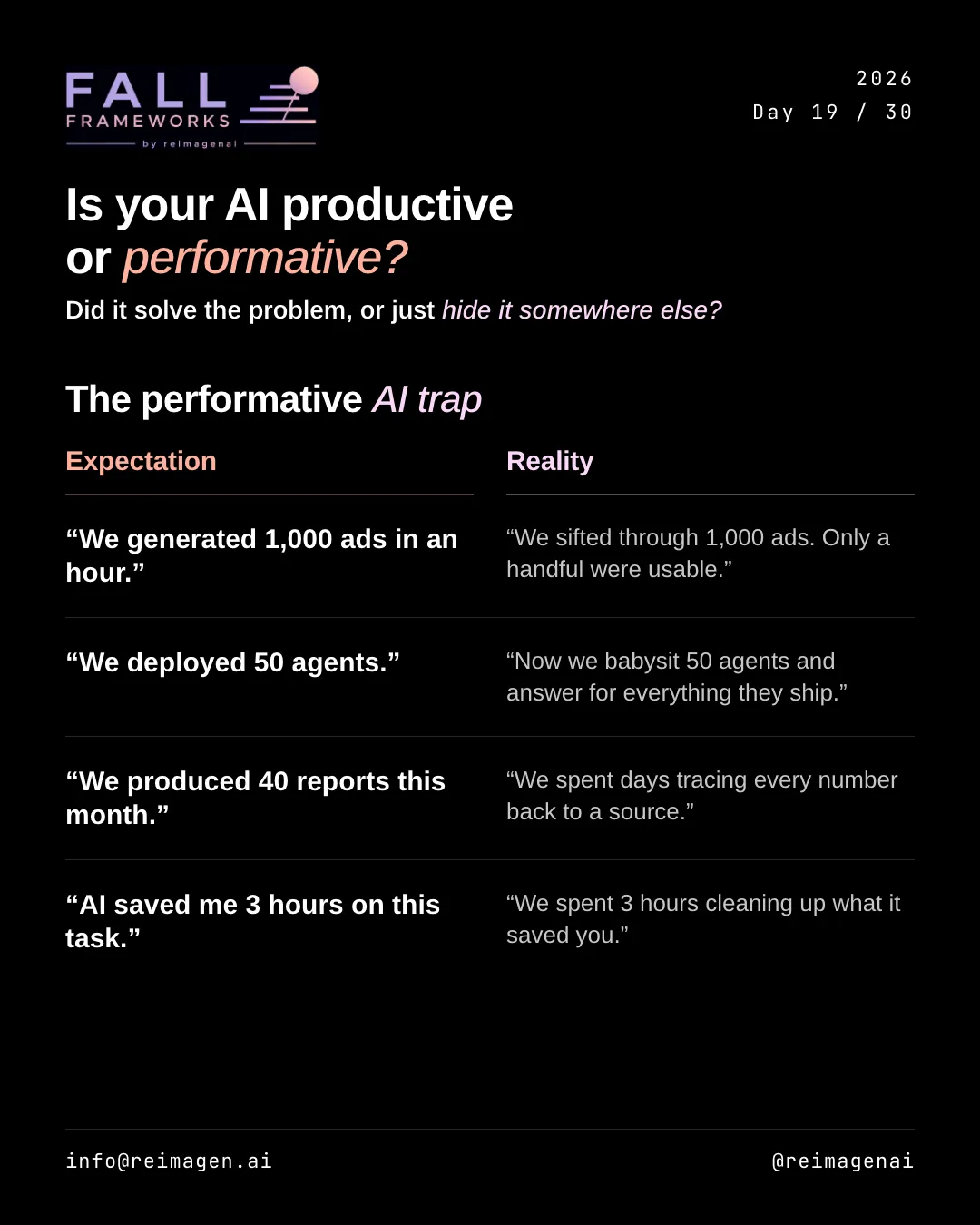
Is your AI productive or performative? Did it solve the problem, or hide it somewhere else? The performative AI trap, expectation vs reality:
The claim
"We generated 1,000 ads in an hour."
The reality: "We sifted through 1,000 ads. Only a handful were usable."
The claim
"We deployed 50 agents."
The reality: "Now we babysit 50 agents and answer for everything they ship."
The claim
"We produced 40 reports this month."
The reality: "We spent days tracing every number back to a source."
The claim
"AI saved me 3 hours on this task."
The reality: "We spent 3 hours cleaning up what it saved you."
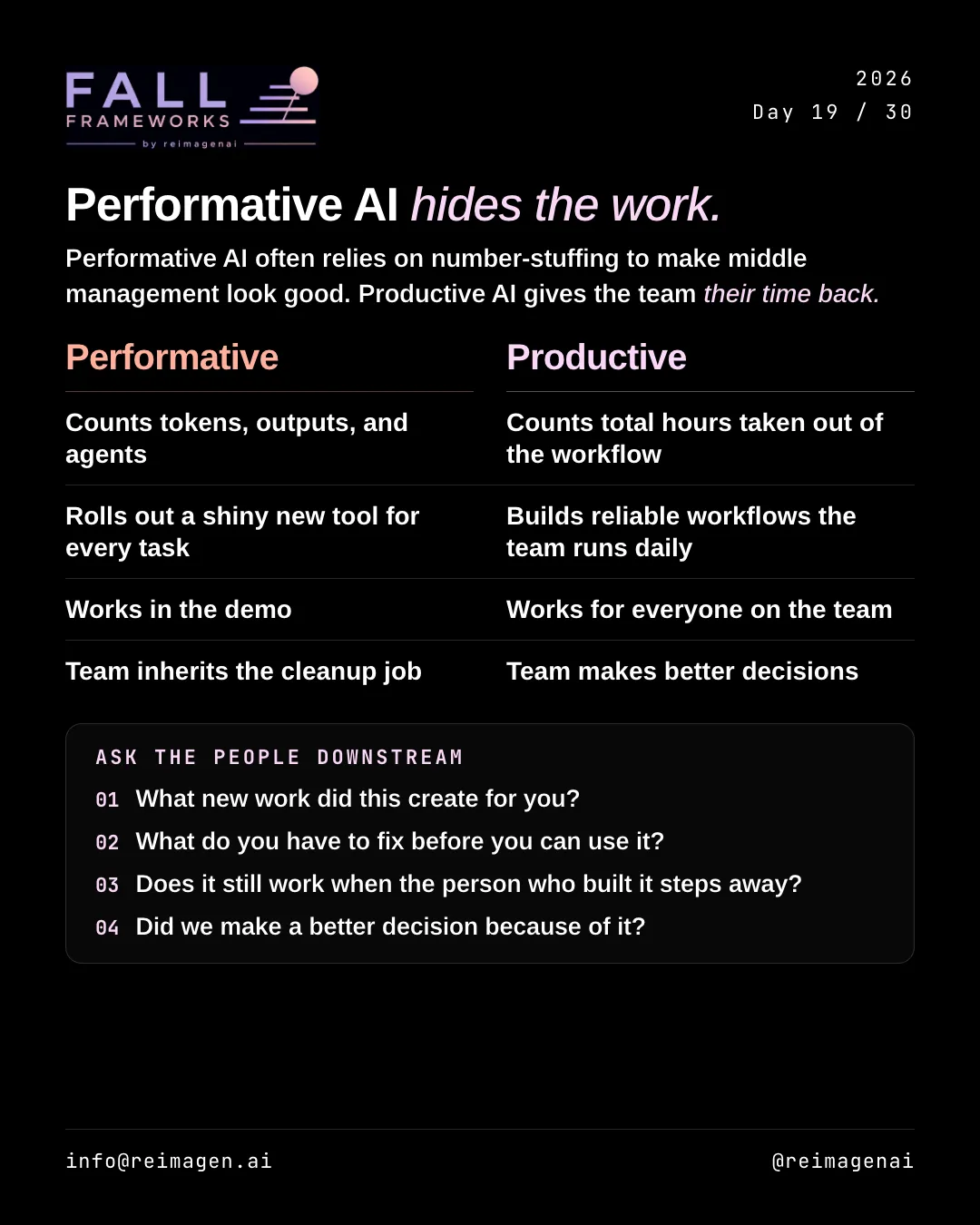
Performative AI hides the work. It often relies on number-stuffing to make middle management look good. Productive AI gives the team their time back.
Performative
Counts tokens, outputs, and agents
Productive: counts total hours taken out of the workflow.
Performative
Rolls out a shiny new tool for every task
Productive: builds reliable workflows the team runs daily.
Performative
Works in the demo
Productive: works for everyone on the team.
Performative
Team inherits the cleanup job
Productive: team makes better decisions.
Ask the people downstream:
What new work did this create for you?
What do you have to fix before you can use it?
Does it still work when the person who built it steps away?
Did we make a better decision because of it?
You can number-stuff nice-looking statistics into any management deck. Most of the time they hide a bigger problem: the work moved downstream. Someone still has to check claims, sift through unusable options, fix broken handoffs, and supervise all those new tools, agents, and processes. That someone is a team member whose time isn't on the dashboard and who can't complain about it for fear of losing their job.
The Downstream Test: did AI help you finish useful work, or move the work to somebody else?
Who's Falling on Your Slop Grenade?
A slop grenade is AI-generated work that looks nice to you and is a disaster for the person who has to review it.
You threw a live bomb onto someone else's desk and expected them to fall on it.
What it costs depends on who catches it.
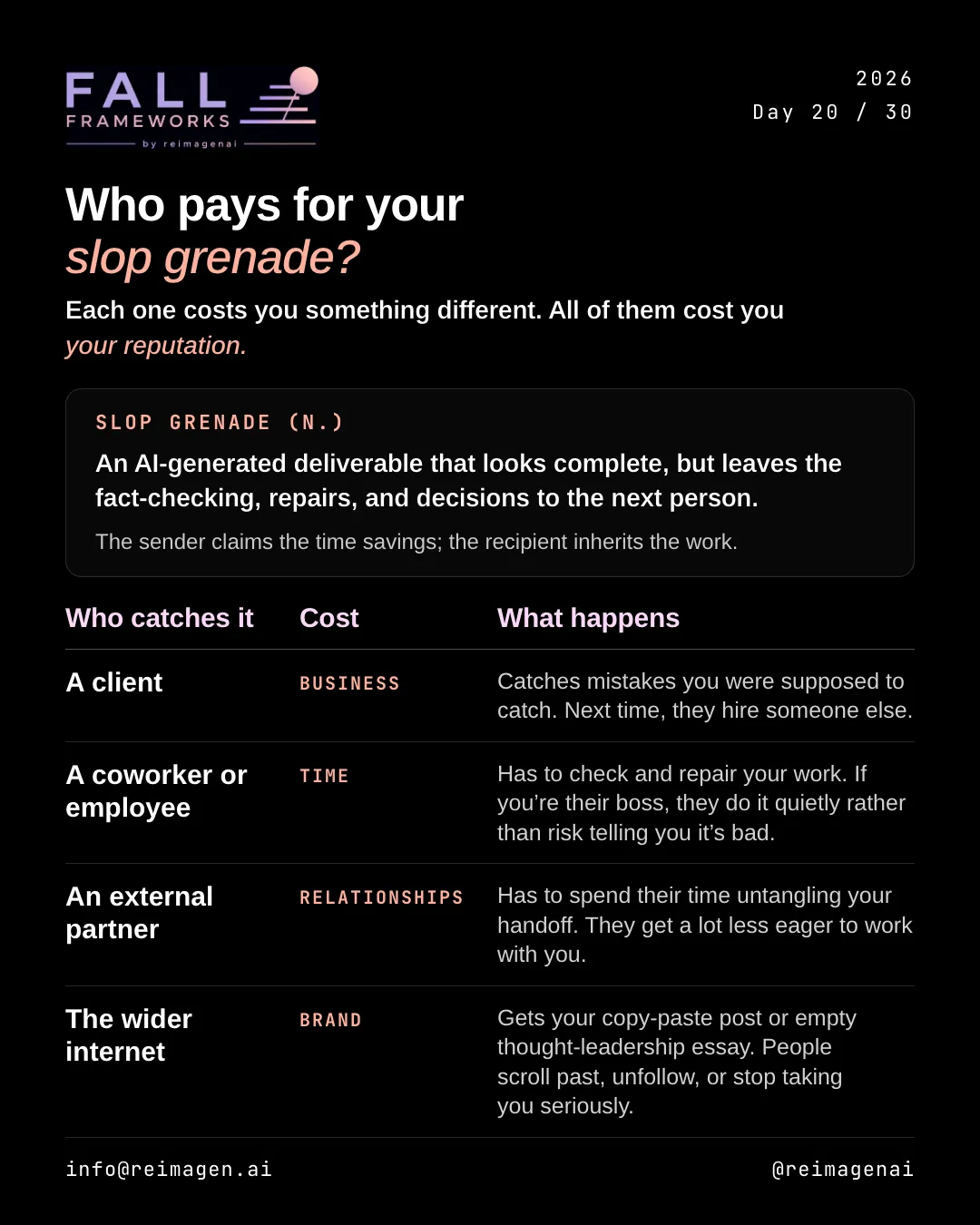
Who pays for your slop grenade? Each one costs you something different. All of them cost you your reputation.
Slop grenade (n.): An AI-generated deliverable that looks complete, but leaves the fact-checking, repairs, and decisions to the next person. The sender claims the time savings; the recipient inherits the work.
Business
A client
Catches mistakes you were supposed to catch. Next time, they hire someone else.
Time
A coworker or employee
Has to check and repair your work. If you're their boss, they do it quietly rather than risk telling you it's bad.
Relationships
An external partner
Has to spend their time untangling your handoff. They get a lot less eager to work with you.
Brand
The wider internet
Gets your copy-paste post or empty thought-leadership essay. People scroll past, unfollow, or stop taking you seriously.
Some of the worst slop grenades come from bosses. An executive forwards a quick AI-generated report: "Take a look at this." The sources don't support the claims, the recommendations ignore client history, and fixing it will take the whole afternoon. How does an employee tell the person who signs their paycheck, "You sent me garbage"?
They don't. Pushing back feels like it could cost them their job. So they quietly repair it, and the boss never sees the cleanup.
Reimagen is often the external partner receiving an unchecked handoff, and pushes back, because the studio can't do someone else's quality control on top of the work it was brought in to do. Your employee may not have that option.
The Slop Grenade Check: if you're the one sending AI work, look hard in the mirror before you celebrate the time you saved:
What did you check?
Which decisions did you make?
How much work will the next person have to do before they can use this?
If you're the boss, ask what they had to repair, and make it safe to answer. Their silence doesn't mean your handoff worked. Your dashboard may say you saved three hours. Find out whether someone else lost them.
Is Your Prototype Now Someone Else’s Problem?
AI is incredible at collapsing the distance between idea and v0.
Reimagen runs prototyping experiments constantly: artifacts, skills, and more. Vibe coding is great for showing people what you mean, learning what they need, and finding out fast whether an idea is worth pursuing. The problem starts when v0 gets shipped blindly across a team.
There's a long way to go between prototype and production. Check the gap with the Two-Column Check: what works for you, and what your team needs before they can use it.
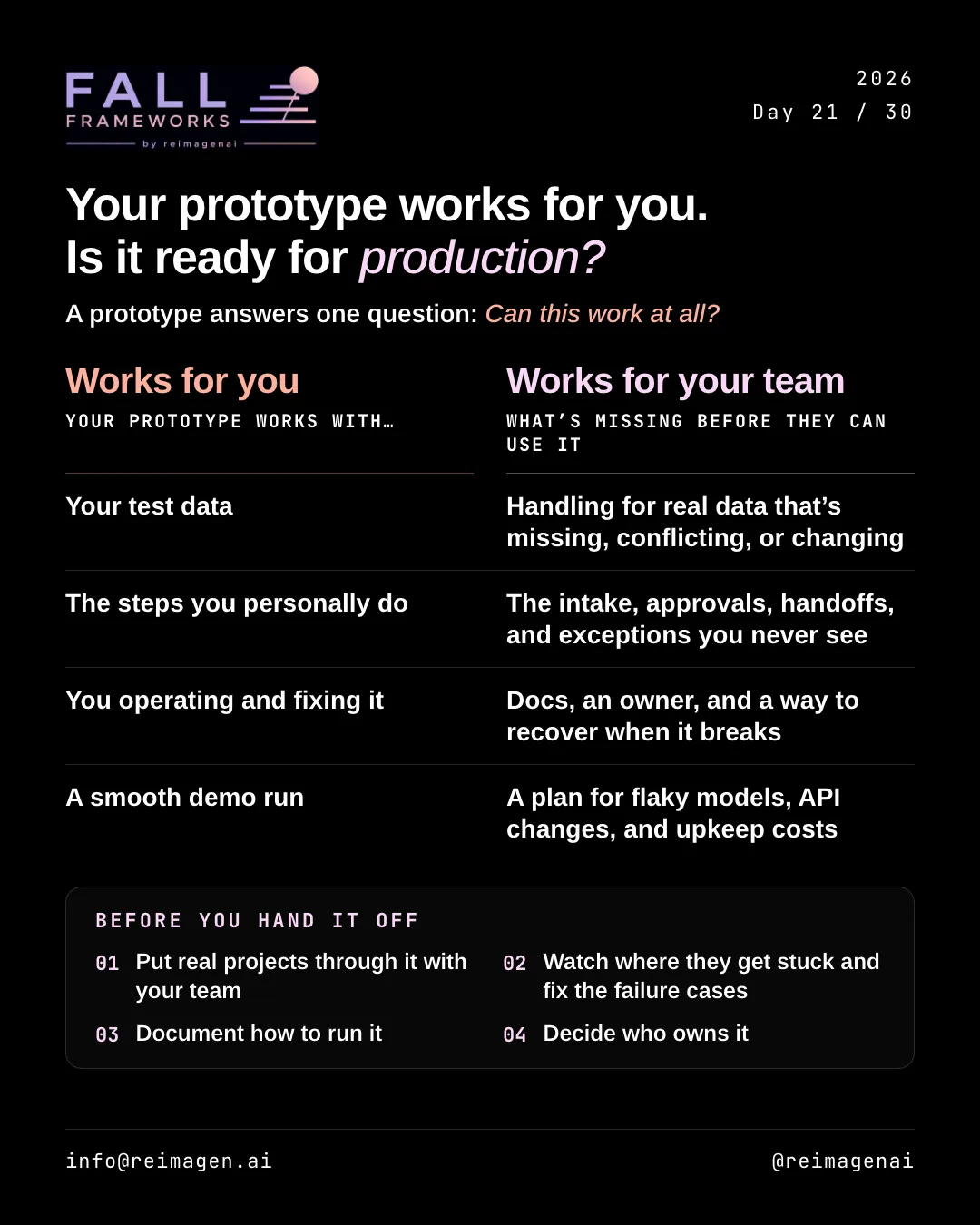
Your prototype works for you. Is it ready for production? A prototype answers one question: Can this work at all?
Works for you
Your test data
Works for your team: handling for real data that's missing, conflicting, or changing.
Works for you
The steps you personally do
Works for your team: the intake, approvals, handoffs, and exceptions you never see.
Works for you
You operating and fixing it
Works for your team: docs, an owner, and a way to recover when it breaks.
Works for you
A smooth demo run
Works for your team: a plan for flaky models, API changes, and upkeep costs.
Before you hand it off:
Put real projects through it with your team
Watch where they get stuck and fix the failure cases
Document how to run it
Decide who owns it
The trap: you vibe code a beautiful project tracker over the weekend and hand it to a colleague on Monday. Charts, color-coded statuses, and a demo that makes everyone say, "Wait, you built this in two days?"
The reality: it worked with your test data. Their projects have missing fields, conflicting statuses, files in the wrong place, and deadlines that keep changing, so it falls apart. When something breaks, there's no way to recover. You got a demo. They got a new job debugging it.
If the tracker makes your life easier, great. Use it. The performative part is announcing that you replaced the team's whole project stack when you solved only the slice of the process you personally oversee. The rest of the work still has to happen, and now your colleagues have another surface to update and check.
The productive version starts with the same prototype. Run it through the four handoff steps, and it ends with a workflow someone else can run without the builder stepping in to fix it.
Are You Suffering from Shiny Tool Syndrome?
"The best companies have hostages, not customers."
A dark saying in SaaS, and it comes to mind every time a new AI workflow tool (cough, wrapper, cough) promises to become the place your team does everything. Once your processes, decisions, and data live in its proprietary setup, leaving is difficult and expensive.
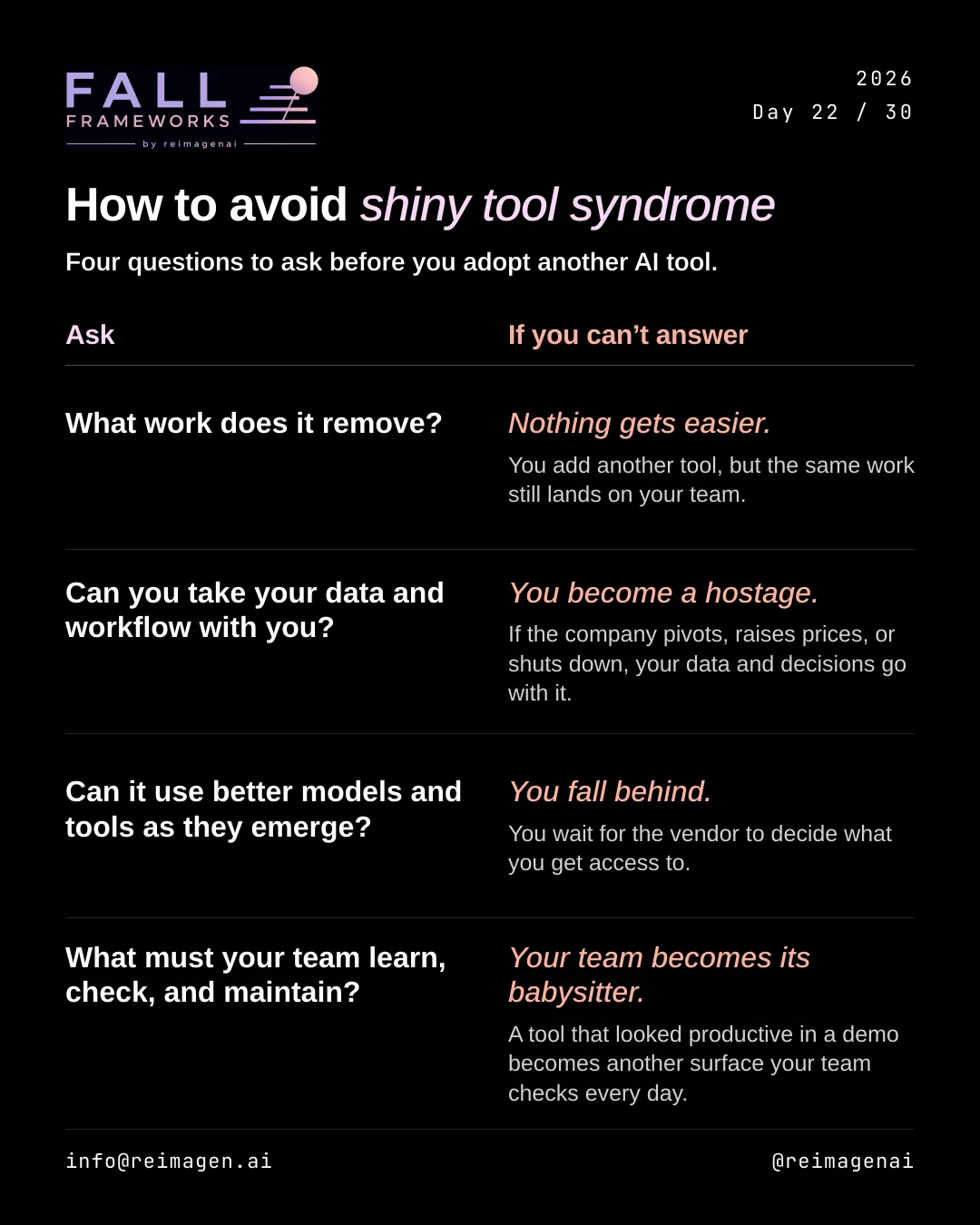
Before you adopt another AI tool, run the Lock-In Check. If you can't answer one of its four questions, here's what it costs:
How to avoid shiny tool syndrome. Four questions to ask before you adopt another AI tool.
Ask
What work does it remove?
If you can't answer: Nothing gets easier. You add another tool, but the same work still lands on your team.
Ask
Can you take your data and workflow with you?
If you can't answer: You become a hostage. If the company pivots, raises prices, or shuts down, your data and decisions go with it.
Ask
Can it use better models and tools as they emerge?
If you can't answer: You fall behind. You wait for the vendor to decide what you get access to.
Ask
What must your team learn, check, and maintain?
If you can't answer: Your team becomes its babysitter. A tool that looked productive in a demo becomes another surface your team checks every day.
The dirty trap: vendor lock-in. It's an old SaaS problem. GenAI makes it riskier for two reasons:
The vendor falls behind. The models you could use directly keep leapfrogging each other while your team waits on whatever the vendor adds, on its timeline.
The vendor disappears. Most AI wrappers being funded right now won't be here in a few years.
Why absorb that risk unless the tool solves a problem nothing else can?
Reimagen builds custom artifacts, skills, and dashboards that work with the tools collaborators already use, and custom infrastructure when production calls for that level of control. Either way, the model or the vendor can be swapped without rebuilding how everyone works.
The question to press hardest before adopting another AI tool: if it stops improving tomorrow, how much of your work is stuck waiting with it?
What Did All That Performative Output Cost?
"We generated 1,000 ads in an hour."
Quantity is one of the easiest things to put on a dashboard. It sounds a lot like "we can get you 10,000 leads." Anyone who's done cold outbound knows to ask: how many are qualified? How many will become purchase-ready customers? How many people came away wanting to block your company?
Ads have the same problem. If you're bootstrapped and AI helps you get a campaign off the ground before you can hire a designer, use it. But cheap, high-volume production doesn't automatically produce good creative, and posting two or three times a day doesn't make it better.
The cost doesn't show up on the dashboard. A dashboard shows what you paid the vendor for: impressions, clicks, sends. The long-term cost lands on your brand, and you'll pay it whether anyone tracks it or not. Most dashboards won't tell you who clicked "not interested," who hit LinkedIn's "Seems like AI slop" button, or who scrolled past and decided your brand keeps showing them the same generic work. You find out later, from the consequences, like email deliverability dropping.
So run the Hidden Cost Audit and track the negative metrics yourself. When you celebrate the report, the prototype, the tool, or the Nth ad, follow it to the people it reached.
Operational cost, paid by your team now:
Did someone have to repair it?
Did someone have to maintain it?
Did someone have to sort through it?
Brand cost, paid by you later:
Did people mute, unfollow, or mark it "not interested"?
Did your emails start landing in spam?
Did a client or partner trust your work less?
Did your audience want to see more from you, or less?
The savings show up on the dashboard right away. The bill comes later, and you pay it with your reputation, your company's or your own. If the end user came out net positive, you did good. Otherwise, back to the drawing board.
Is It Worth It?
What's worth paying for, building, or hiring once the AI work is useful?
The final stretch covers what it takes to depend on the AI work that is useful: when to pay for a better model, what context an agent needs, when to build integrations, which agents to hire, and when the bleeding edge is worth it.
When Is a Better Model Worth the Money?
Run every shot through a premium model and you burn credits on shots that didn't need it. Run everything cheap and the complex shots fall apart.
Cheap Pass, Premium Run: three questions decide which model gets the shot:
How complex is the shot? Dialogue, character interactions, camera movements, and precise blocking may need a stronger model from the start.
What are you trying to validate? If you're testing staging or comedic timing, a cheap first pass can show you what works.
When should you spend more? Once you know what you want, invest in the model best equipped to deliver it.
AI on the Lot's Sunday Sprint, hosted with OpenArt, put this to the test. Draw a random year out of a bowl, then create an animated pilot about someone's first day at a new job, in about five hours with limited credits.
In a team collab, Reimagen produced The Royal PIP. Think HR and middle management are bad today? Try England in 1265. Jack, a young royal portraitist, starts his first day dealing with an impossible boss, a king who can't be questioned, and workplace politics that could literally get him executed. "Severance package" meant something else entirely back then.
Complex shots and scenes over 15 seconds went straight to Seedance 2.5 or Kling AI 4. Simpler, shorter shots got a MiniMax H3 Max pass first to see whether the premium run was even needed. CapCut handled the edit, color grade, and grain to pull it all together.
Watch The Royal PIP below. Don't show it to HR.
The Royal PIP: A Medieval Workplace Comedy
Is Faster and Cheaper AI Making You Slower?
It's easy to celebrate cost savings in one bucket without tallying the hidden costs in another.
The True Cost Check: before declaring a tool or model a bargain, ask:
What's your success rate? Fast results aren't impressive if you need way more attempts to get a usable one.
How much work happens between attempts? Reviewing, rewriting, and troubleshooting all take time.
Would a more capable model save you time? Time is valuable, so paying a bit more upfront is often worth it.
Goodnight Cat, Goodnight Bat is a simple animated short built to test MiniMax H3 Max, the cheap first-pass model from The Royal PIP, on fal. Reimagen's custom Nous Research Hermes video pipeline tracked the generations, reviewed takes, and produced a wrap report.
The good news:
21.3-second median turnaround. Ridiculously fast, to the point that the human approval step became the bottleneck. More powerful models easily take 6x longer to return.
$10 for a 30-second short. Ridiculously cheap.
The bad news:
A 25% average success rate. More powerful models usually get there in one or two takes.
Characters stole each other's dialogue or mouthed lines that weren't theirs.
Faces couldn't figure out which way was up when the cat and bat flipped or fell.
The model invented an extra cat on some takes.
Reimagen won on generation speed and cost, and paid for those savings in time.
Watch Goodnight Cat, Goodnight Bat below.
Goodnight Cat, Goodnight Bat: An Animated Bedtime Story
Does Your Agent Know What You Want?
Throw an agent a mountain of context and let it figure out the rest, and you'll probably get recommendations that miss the point.
The Context Brief: spell these out:
What to look at: your history, relationships, projects, and relevant information.
What you want: what you're trying to accomplish, what matters most, and what you're willing to trade off.
What it won't know: the fuzzy parts that don't show up in data.
Case in point: SF and LA Tech Week, the same planning problem from Day 15. Thousands of events, no way to clone yourself IRL, and a horrifying Google Calendar view.
So Reimagen built an artifact in Claude, connected it to Tech Week by a16z's official MCP, and fed it the business context and event history that lives in the Obsidian vault. Every event had to pass four questions:
Who's in the room? Are the hosts, speakers, and attendees people worth meeting this particular week?
When can you talk to them? Is there a real networking window, or hours of panels?
Can you get there? Claude might think a trip across town and back fits in an afternoon. LA rush hour traffic would disagree.
Do you need to go? Is there business-aligned value for Reimagen, or is this event FOMO?
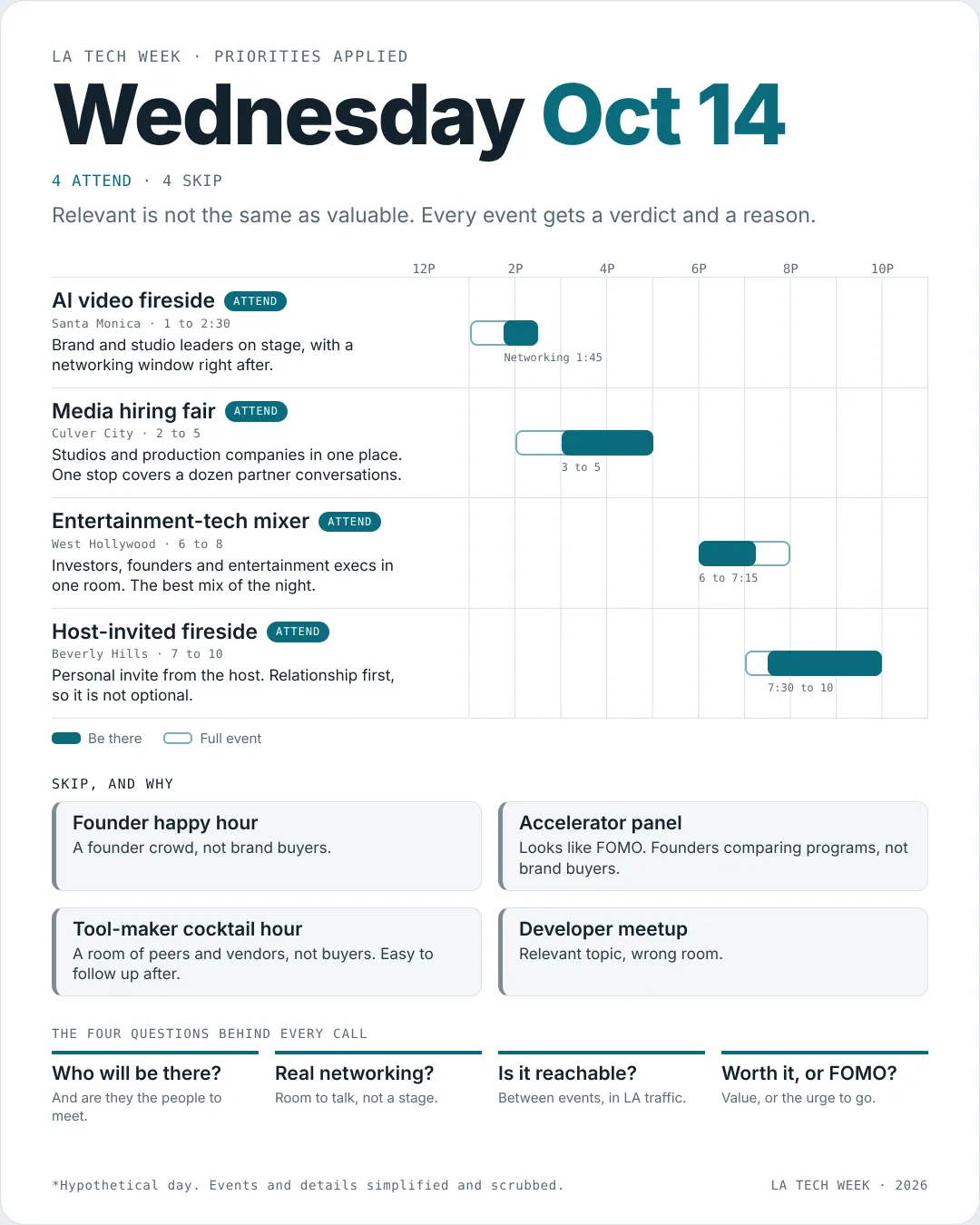
The revised planner produced a daily schedule with reasons to attend or skip and specific attendance windows. Much more useful than a giant blob of events on a calendar and figuring it out yourself. Here's one hypothetical day:
LA Tech Week, priorities applied. Wednesday Oct 14. 4 attend, 4 skip. Relevant is not the same as valuable. Every event gets a verdict and a reason.
Attend
AI video fireside
Santa Monica, 1 to 2:30. Be there: networking 1:45. Brand and studio leaders on stage, with a networking window right after.
Attend
Media hiring fair
Culver City, 2 to 5. Be there: 3 to 5. Studios and production companies in one place. One stop covers a dozen partner conversations.
Attend
Entertainment-tech mixer
West Hollywood, 6 to 8. Be there: 6 to 7:15. Investors, founders and entertainment execs in one room. The best mix of the night.
Attend
Host-invited fireside
Beverly Hills, 7 to 10. Be there: 7:30 to 10. Personal invite from the host. Relationship first, so it is not optional.
Skip, and why:
Skip
Founder happy hour
A founder crowd, not brand buyers.
Skip
Accelerator panel
Looks like FOMO. Founders comparing programs, not brand buyers.
Skip
Tool-maker cocktail hour
A room of peers and vendors, not buyers. Easy to follow up after.
Skip
Developer meetup
Relevant topic, wrong room.
The four questions behind every call:
Who will be there? And are they the people to meet.
Real networking? Room to talk, not a stage.
Is it reachable? Between events, in LA traffic.
Worth it, or FOMO? Value, or the urge to go.
Hypothetical day. Events and details simplified and scrubbed.
Do You Need MCP?
What is MCP, and how is it different from the plugins and connectors you already use in ChatGPT or Claude?
MCP stands for Model Context Protocol. It's an open standard that lets AI applications connect to external tools and data. Think of it as a common language for discovering what tools are available, what they can do, and how to use them.
Do you need it if your AI already has plugins? Depends on the use case.
Plugins and connectors are ready-made integrations, typically built and maintained by the vendor or platform. Connect your account and go. Fine for most situations.
MCP servers expose tools and data through a standard interface. Vendors often provide their own, and you can also build one yourself.
Here's where it gets confusing: plugins can use MCP behind the scenes. The important question is whether the integration gives you the capabilities you need.
The catch with vendor integrations: you're limited to whatever tools and actions the vendor exposes. Building your own gives you more control, plus security, authentication, debugging, and maintenance. Congratulations, you're now the IT department. Enjoy your new can of worms.
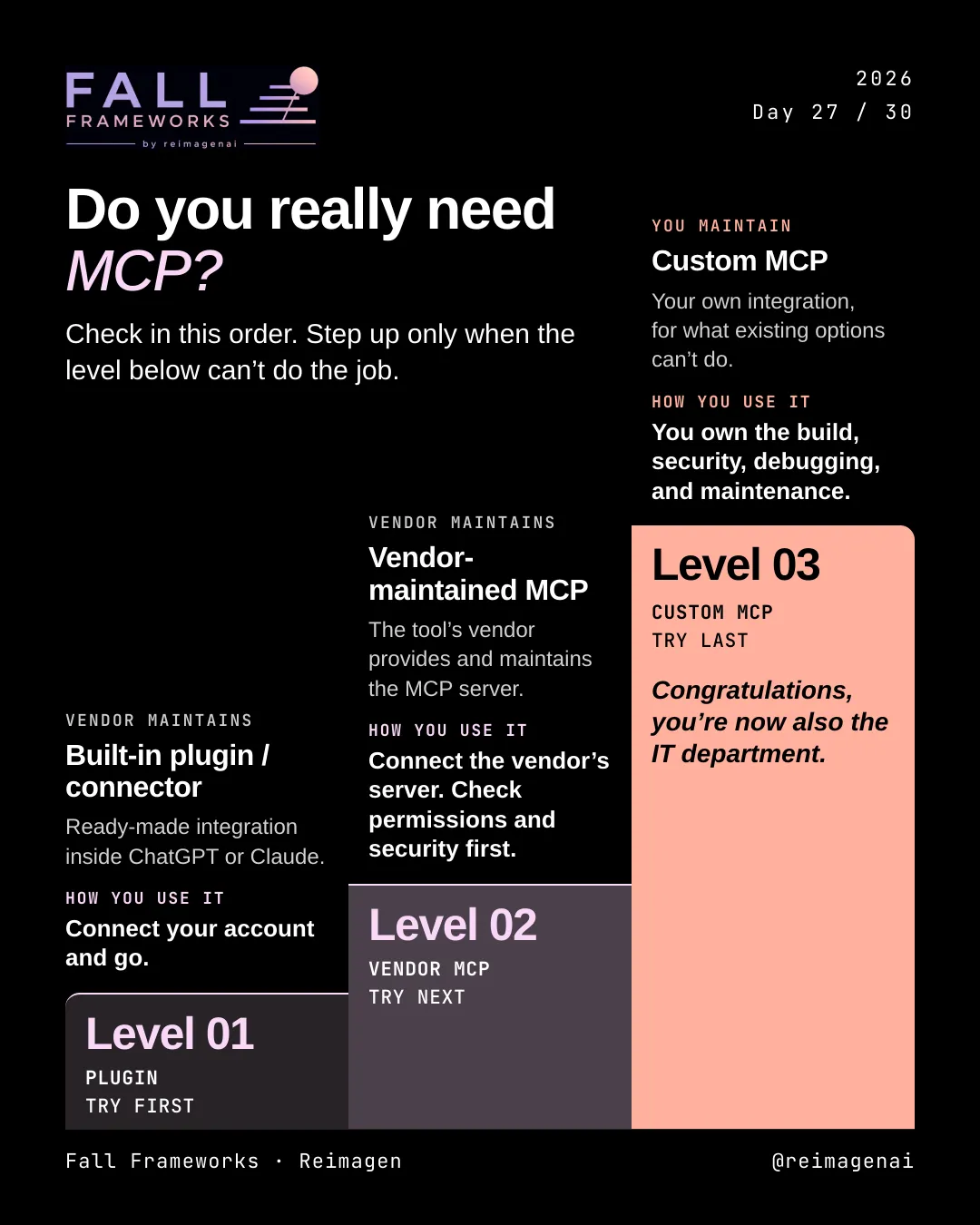
Reimagen's MCP Ladder: treat it as a decision path. The levels can overlap under the hood, and the question at each one is the same: does this do what you need? Check in this order, and step up only when the level below can't do the job.
Do you really need MCP? Check in this order. Step up only when the level below can't do the job.
Level 01, plugin, try first. Built-in plugin / connector. Vendor maintains. Ready-made integration inside ChatGPT or Claude. How you use it: connect your account and go.
Level 02, vendor MCP, try next. Vendor-maintained MCP. Vendor maintains. The tool's vendor provides and maintains the MCP server. How you use it: connect the vendor's server. Check permissions and security first.
Level 03, custom MCP, try last. Custom MCP. You maintain. Your own integration, for what existing options can't do. How you use it: you own the build, security, debugging, and maintenance. Congratulations, you're now also the IT department.
Should You Hire That New AI Agent?
Clawdia, Reimagen's OpenClaw agent, has been retired.
Early followers of the claw nicknamed it BrokenClaw, and the headaches were real. So when Nous Research Hermes released, Reimagen resisted the hype train, let others be the guinea pigs for a couple of months, then got on board.
Now there are even more options: Meta Muse, OpenAI's Dots, Anthropic's Duet. With the big players launching AI assistants every few weeks, Reimagen is a lot pickier about who gets hired.
The Agent Hiring Test: before hiring or firing an AI agent, ask three questions:
What's the upside of being early? The classic bleeding-edge argument: is the problem painful enough that being early is worth it?
What evidence is there? At peak hype train, Reimagen is out. Come back when power users have been consistently satisfied with the output.
What's the cost of switching? Migrating to and setting up Hermes took about an hour. Can't say the same for the original OpenClaw setup.
Recent decisions:
Fire: OpenClaw. Darling Clawdia, RIP. It served its purpose, and newer solutions offered more.
Pass: Meta Muse. Alexandr's posting run has been thoroughly entertaining, but that's not enough to earn trust in Muse, let alone a connection to personal data or business systems. Great content, though.
Wait: OpenAI's Dots and Anthropic's Duet. Neither offers enough reason to disrupt the Hermes setup.
Every new agent promises to take work off your plate. Make sure you're not shoveling it from one plate onto another.
When Is the Bleeding Edge Worth Bleeding For?
Day 2 warned about the cost of living on the bleeding edge. Sometimes the bleeding is on purpose.
Reimagen Labs, the frontier tinker zone, carves out time to test technology that needs a little more time in the oven. To decide what's worth getting on the struggle bus for, run the Struggle Bus Test:
Can you see where this is going? Even if today's results are rough?
Can you live with what's imperfect? Or will you be angry fighting the tech?
Are you learning something useful? What will you carry forward when the models get better?
Enter Dog Park Diaries, a livestream GenAI sitcom about what your dogs are saying to each other at the park. The stack is Reactor's Fast H3 Omni, OpenRouter, LiveKit, and Vercel. Because 5 seconds of video generates in 3, it can run as a livestream show.
Why dogs? Besides the fact that the internet loves them, the technical constraints suit them:
Characters: real-time generation supports up to three image references. Hence the generic dog breeds. Even then, the golden retrievers occasionally swap identities.
Voices: consistency is rough.
Timing: fixed clip lengths mean awkward pauses, sometimes filled with completely made-up gibberish.
Blocking: still inconsistent shot to shot despite prompting, because there's no way to grab last frame and first frame for continuity.
Is Dog Park Diaries going to win any Emmys? Not this season. Real-time models are in their Will Smith spaghetti era. But they improve.
The first question from dog owners is always "Wait, can I put my dog in there?" Not today. In the near future, you, your dog, or anyone could be the main character.
Imagine typing "make Craig the corgi chase that squirrel." In your timeline, Craig gets into a fight with the Jack Russell terrier. In someone else's, he sniffs the new dog the wrong way and starts a completely different, even more chaotic storyline.
Interactive storytelling, personalized characters, parallel timelines. Reimagen is here for world-building and multiverses.
Go check out the dogs at Dog Park Diaries. The park is open in the mornings and evenings, like a real dog park's peak hours.
Can I? Should I? Is It Worth It?
In a world of seemingly infinite possibilities, how should you spend your time?
Every week, a new model, tool, or agent promises to help you break new barriers. You still only have 24 hours in a day. Before jumping into the next shiny thing, ask three questions:
Can I? What's possible, and where are the limits?
Experiment. Test new tools, push models to their limits, and try the weird ideas. Generate wide, execute narrow. But a promising prototype and a production-ready solution are a long way apart. Don't let one successful vibe coding session convince you it's ready to ship.
Should I? Is this the right approach?
Start with what you're trying to solve. Do you need AI, or is your process the root problem? Take a good, hard look in the mirror before throwing more AI at it. The uncomfortable part: do you know what good looks like? AI can get you pretty far, but you still need the expertise to evaluate the results. Know when to call in the experts.
Is it worth it? Does the value justify the investment?
Look beyond token costs and count your time, failed attempts, review, rework, and maintenance. Are you saving overall, or moving the costs between buckets? Did your vibe-coded tool solve one problem and create three more that someone else now has to solve?
You can't chase every possibility. You can get better at recognizing which ones deserve your time, attention, and resources. The technology will keep improving, and what's impossible today might be possible tomorrow. Stay curious, keep experimenting, and choose your battles. Then greenlight the big idea.
Want your team making these calls?
Reimagen team training covers where AI belongs in your workflows, safe permissions and data access, and cost-efficient usage.